
Ten marketing workflows built as loops rather than prompts, so the work keeps going until it meets a standard instead of stopping at the first draft.
' Most marketing teams use AI like a faster intern. Write this post. Refresh this page. Improve this email. Summarize this campaign. Give me ideas. The output arrives quickly. Then the real work starts.
You still need to check the angle, fix the CTA, add proof, remove generic filler, tighten the offer, format the asset, and decide whether it is good enough to use.
Join the waitlist and get notified when the new AdLume is ready. It catches wasted ad spend automatically and optimises campaigns around the clock.
One email, on the day access opens. Nothing else, and you can leave the list with one click.
That is where a lot of AI-assisted marketing work dies. Not at the first draft. At 80 percent.
Ralph Loop is useful because it changes the workflow from "give me an answer" to "keep improving this until it meets a clear completion condition."
In Claude Code, Ralph Loop lets Claude repeat the same task, see its previous work, and keep iterating until it hits your completion promise or reaches the iteration limit.
That sounds like a developer tool.
But the underlying pattern is very marketing-friendly:
Define the job. Define what good looks like. Let Claude take multiple passes. Review before anything goes live.
This article gives you 10 Ralph Loop workflows you can adapt for marketing work.
Ralph Loop is an Anthropic verified Claude Code plugin for iterative AI work. Anthropic describes it as a way to create loops where Claude works on the same task repeatedly, seeing prior work until completion.
The plugin re-feeds your prompt between iterations while preserving file changes and git history. In plain English: Claude can look at what it just produced, compare it with your completion condition, and try again.
The basic usage pattern looks like this:
/ralph-loop "your prompt here" --max-iterations 10 --completion-promise "DONE"
The loop stops when Claude outputs the completion promise or hits the iteration limit. You can cancel it with:
/cancel-ralph
The command matters less than the completion condition.
Bad prompt.
Improve this landing page.
Better prompt.
Improve this landing page until the headline, CTA, proof, objections, and mobile
  readability pass the checklist.
The second version gives Claude a standard. It also gives you a clean review point.
The easiest path is to use the official Ralph Loop plugin page from Anthropic.
Example.
/ralph-loop "Refresh this lead magnet until the title, promise, structure, examples,
  CTA, and LinkedIn distribution note pass the checklist. Output DONE only when the
  asset is ready for human review." --max-iterations 5 --completion-promise "DONE"
A good Ralph Loop task needs five things:
For marketing, add one more thing:
You do not want AI publishing posts, changing ad spend, emailing leads, or editing live landing pages just because a loop finished.
Let it prepare the work. Keep the external action human-approved.
Use this when an older article still has potential, but needs a real refresh instead of a light edit.
Good for.
Use Ralph Loop to refresh this SEO article until it is publish-ready.

Inputs:
- current article draft or URL content
- target keyword
- search intent summary
- internal links to consider
- brand style rules
- product CTA rules

Task:
Improve the article across:
1. search intent match
2. intro clarity
3. outdated claims
4. missing examples
5. internal links
6. CTA relevance
7. readability

Rules:
- Do not invent statistics.
- Mark unsupported claims as [NEEDS SOURCE].
- Keep the article focused on one search intent.
- Do not publish or update the live page.

Completion condition:
Output DONE only when the article has:
- a stronger introduction
- updated H2 structure
- at least 3 relevant internal link opportunities
- a clear product or lead magnet CTA
- a short QA checklist
- no unsupported claims left unmarked

Max iterations: 5
Why it works.
Most SEO refreshes become random editing. This loop keeps the task tied to intent, sources, internal links, and conversion.
Use this when a page is live, but nobody is sure whether the issue is offer clarity, proof, CTA, or friction.
Good for.
Use Ralph Loop to improve this landing page until the conversion argument is clear.

Inputs:
- landing page copy
- traffic source
- target audience
- primary CTA
- known objections
- available proof points

Task:
Review and improve:
1. headline clarity
2. problem relevance
3. offer promise
4. proof
5. objection handling
6. CTA specificity
7. mobile readability

Rules:
- Do not rewrite the whole page unless necessary.
- Keep the main CTA unchanged unless you flag a recommended change.
- Separate facts from assumptions.
- Do not publish changes.

Completion condition:
Output DONE only when you provide:
- top 5 conversion issues
- revised hero section
- revised CTA copy
- missing proof recommendations
- before/after rationale
- human approval checklist

Max iterations: 4
Why it works.
A good landing audit should end with changes a human can approve, not a vague list of opinions.
Use this when the asset exists, but it does not feel sharp enough to earn a comment, signup, or share.
Good for.
Use Ralph Loop to polish this lead magnet until it is clear, useful, and easy to
  distribute.

Inputs:
- lead magnet draft
- target audience
- distribution channel
- comment keyword or signup CTA
- related product CTA
- examples of previous high-performing assets

Task:
Improve the lead magnet across:
1. title
2. promise
3. structure
4. usefulness
5. examples
6. next step
7. shareability

Rules:
- Do not make the asset longer just to look more valuable.
- Remove generic AI filler.
- Keep the language practical.
- Add clear usage instructions.
- Do not create public claims without support.

Completion condition:
Output DONE only when the asset has:
- clear title
- one-sentence promise
- clean table of contents
- practical examples
- short setup or usage guide
- clear CTA
- LinkedIn distribution note

Max iterations: 5
Why it works.
Lead magnets often fail because they are almost useful. This loop keeps pushing until the asset is actually usable.
Use this when you have a real resource and need a post that makes people want to comment for it.
Good for.
Use Ralph Loop to turn this lead magnet into a viral LinkedIn post draft.

Inputs:
- lead magnet title
- what is inside
- target audience
- why it is useful
- previous winning post examples
- comment keyword
- voice rules

Task:
Create and improve a LinkedIn post that:
1. opens with the asset
2. explains the pain behind it
3. lists what is inside
4. proves why it is practical
5. keeps the CTA simple
6. avoids hype
7. sounds like a human founder

Rules:
- Do not use hashtags.
- Do not add fake numbers.
- Do not over-explain the tool.
- Keep the post easy to skim.
- Keep the CTA as a comment keyword.

Completion condition:
Output DONE only when the post includes:
- strong first line
- short setup
- list of what is inside
- clear practical benefit
- clean comment CTA
- 5 alternate hooks
- delivery DM copy

Max iterations: 5
Why it works.
Viral asset posts are not essays. The job is to make the value obvious enough that the right person asks for the resource.
The full library of AdLume skills: paid ads, landing pages, B2B leads, GTM tracking, e-commerce.
The bundle goes straight to your inbox, then one email a week. Unsubscribe in one click. We never share your address.
Use this when you want a clean decision from campaign data without turning it into a full strategy project.
Good for.
Use Ralph Loop to turn this weekly ads data into a decision-ready readout.

Inputs:
- campaign export
- previous week baseline
- target KPI
- known tracking caveats
- budget changes
- campaign notes

Task:
Analyze:
1. spend
2. conversions
3. CPA or ROAS
4. CTR
5. CPC
6. conversion rate
7. lead quality signal if available

Rules:
- Do not claim causality from one metric.
- Separate facts, hypotheses, and missing data.
- Flag tracking issues clearly.
- Do not recommend spend changes without approval.

Completion condition:
Output DONE only when the readout includes:
- 5 bullet summary
- metric table
- what changed
- likely explanations
- risks
- recommended next action
- approval gate if spend or campaign changes are involved

Max iterations: 4
Why it works.
Performance readouts get dangerous when AI sounds confident from thin data. This loop keeps missing data visible.
Use this when you need sharper ad angles before writing copy or building creatives.
Good for.
Use Ralph Loop to create stronger ad creative angles for this offer.

Inputs:
- offer
- target audience
- current landing page
- known pains
- objections
- proof points
- past winning and losing ads if available

Task:
Develop and improve creative angles across:
1. pain angle
2. outcome angle
3. objection angle
4. proof angle
5. urgency angle
6. comparison angle
7. founder perspective angle

Rules:
- Do not write finished ads yet.
- Do not invent proof.
- Avoid generic AI claims.
- Keep each angle tied to a specific buyer problem.

Completion condition:
Output DONE only when you provide:
- 10 angle ideas
- audience pain behind each angle
- suggested hook
- proof needed
- risk or weakness
- top 3 angles to test first

Max iterations: 4
Why it works.
Most ad copy gets weak before the copy stage. The angle is unclear, so everything downstream sounds generic.
Use this when the marketing sounds fine, but people still do not understand why they should care.
Good for.
Use Ralph Loop to tear down and improve this offer.

Inputs:
- current offer copy
- target audience
- price or commitment required
- main CTA
- known objections
- proof available
- alternatives the buyer considers

Task:
Improve the offer across:
1. audience specificity
2. pain clarity
3. promised outcome
4. mechanism
5. proof
6. risk reversal
7. next step

Rules:
- Do not add promises we cannot prove.
- Do not make the offer broader.
- Do not rewrite in corporate language.
- Mark assumptions clearly.

Completion condition:
Output DONE only when you provide:
- current offer diagnosis
- strongest revised offer statement
- what to remove
- what proof is missing
- main objection and answer
- revised CTA

Max iterations: 5
Why it works.
If the offer is fuzzy, more traffic only buys more confusion.
Use this when someone downloaded a resource, joined a list, or engaged with your content, but the next step is not clear.
Good for.
Use Ralph Loop to improve this email until it creates a clear bridge from interest to
  demo.

Inputs:
- current email draft
- source of the lead
- lead magnet or asset they requested
- target audience
- demo promise
- objections
- tone rules

Task:
Improve the email across:
1. relevance to the asset
2. first sentence
3. reason to care now
4. demo promise
5. CTA clarity
6. friction
7. follow-up logic

Rules:
- Do not make the email longer than necessary.
- Do not sound like a mass blast.
- Do not invent personalization.
- Do not send anything.

Completion condition:
Output DONE only when you provide:
- revised email
- shorter variant
- subject line options
- CTA options
- why the demo bridge works
- approval checklist before sending

Max iterations: 4
Why it works.
Interest is fragile. If the bridge from resource to next step is vague, the lead goes cold.
Use this when you need sharper positioning before writing a page, ad, or post.
Good for.
Use Ralph Loop to scan competitor messaging and find positioning gaps.

Inputs:
- competitor page copy or URLs copied into context
- our current positioning
- target audience
- product strengths
- claims we can prove
- claims we should avoid

Task:
Analyze competitor messaging across:
1. headline promise
2. target audience
3. mechanism
4. proof
5. pricing or commitment
6. objections handled
7. language patterns

Rules:
- Do not scrape or access anything outside the provided inputs unless approved.
- Do not copy competitor phrasing.
- Separate observation from recommendation.
- Mark weak evidence clearly.

Completion condition:
Output DONE only when you provide:
- competitor message map
- repeated category claims
- gaps or overused promises
- our strongest differentiation angles
- claims to avoid
- 5 headline territories to test

Max iterations: 4
Why it works.
Most teams write in a vacuum, then wonder why their page sounds like everyone else's.
Use this after a campaign, content test, landing page test, or lead magnet push.
Good for.
Use Ralph Loop to turn this experiment into a decision memo.

Inputs:
- experiment goal
- hypothesis
- what changed
- date range
- metrics
- qualitative feedback
- screenshots or notes if available

Task:
Create a decision memo covering:
1. what we tried
2. what happened
3. what we learned
4. what did not move
5. what is still unknown
6. what to do next
7. what to stop doing

Rules:
- Do not overread small samples.
- Separate signal from noise.
- Mark missing data.
- Do not recommend scaling without approval.

Completion condition:
Output DONE only when the memo includes:
- result summary
- metric table
- lessons
- decision options
- recommended next step
- kill or continue criteria
- approval gates

Max iterations: 4
Why it works.
Experiments are only useful if they change the next decision. Otherwise they become activity with a dashboard attached.
Ralph Loop is powerful because it can keep going.
That is also the risk.
For marketing work, do not let a loop do externally visible work by default. It can prepare a draft, write a readout, check a page, build a queue, or suggest changes.
Publishing, sending, changing ad spend, editing live tracking, emailing leads, or making public claims should stay human-approved.
A useful marketing loop should include:
The completion condition is the whole game.
If you ask Claude to "make it better", it will make something different and call it better. If you define the standard, it can work toward the standard.
That is the real lesson from Ralph Loop for marketers.
The future of AI-assisted marketing is probably less about collecting more prompts and more about building small operating loops around work that repeats.
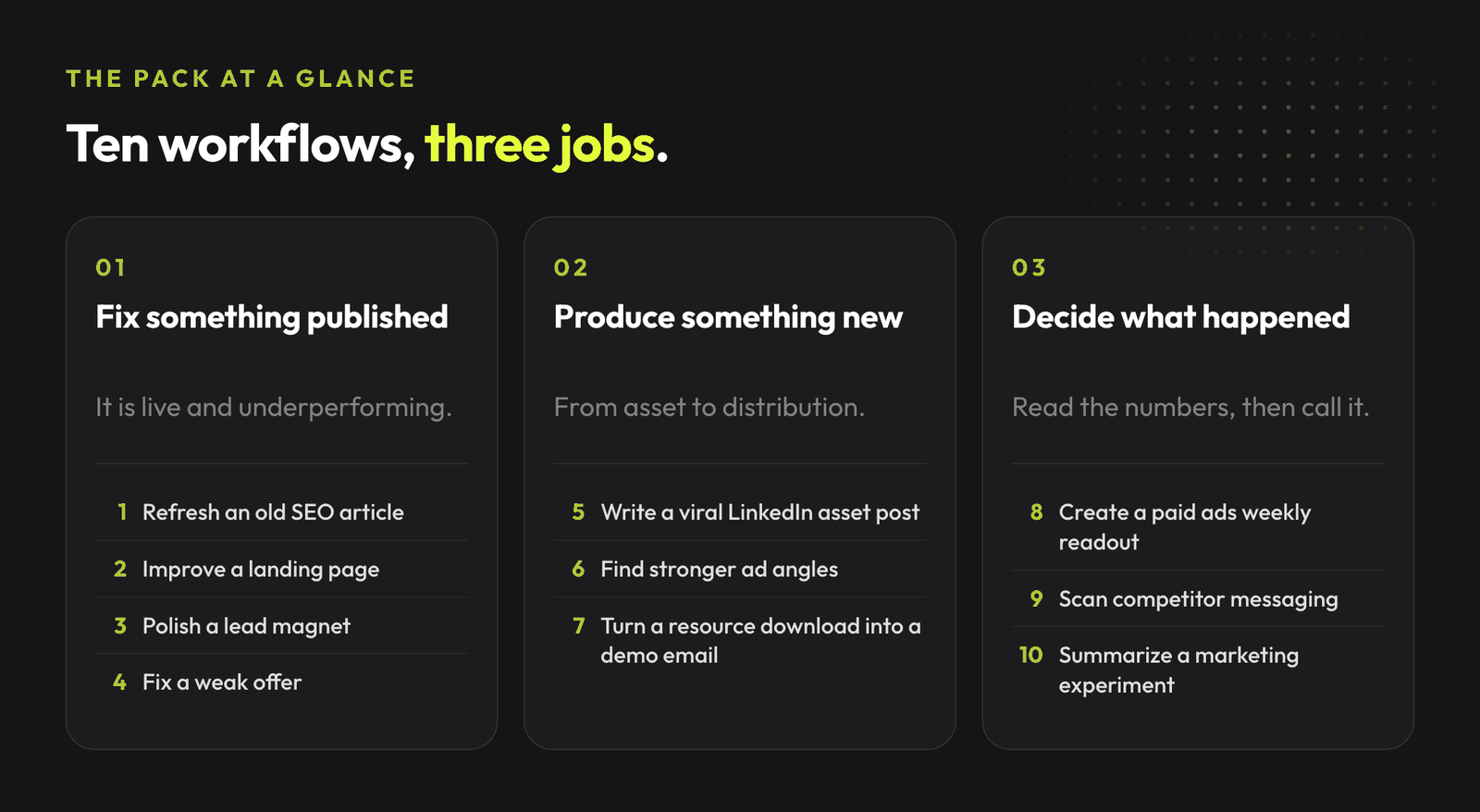
SEO refresh. Landing page conversion. Lead magnet polish. Viral post drafts. Ads readouts. Offer teardown. Demo bridge emails. Experiment recaps.
Small loops. Clear standards. Human approval before anything external.
That is much more useful than another prompt library.
I put these 10 Ralph Loop workflows into a copy-paste setup guide for marketers.
Use it when you want Claude Code to improve a bounded piece of marketing work across multiple passes instead of giving you one draft and disappearing.
If you run performance marketing accounts and want the same kind of decision loop inside your Google Ads work, the banner above is the cleanest next step.
If you want platform-specific examples for ad account work, start with the AI in Google Ads agency playbook and the AI in Meta Ads playbook.
AdLume watches your ad accounts and brings the next fix to your team's tools.
One email, on the day access opens. Nothing else, and you can leave the list with one click.
It was built for Claude Code and is most obvious in coding workflows, but the underlying pattern also fits bounded marketing tasks that need multiple passes and a clear completion condition.
Use the official Anthropic plugin page for Ralph Loop and install it in Claude Code through the plugin flow. After that, run a bounded task with the Ralph Loop command, a max iteration limit, and a completion promise.
It can only do what your environment and permissions allow, but you should not use it to publish marketing assets automatically. Let it prepare drafts, QA notes, and recommendations. Keep public actions human-approved.
Tasks with clear inputs, repeatable review criteria, and a visible end state. SEO refreshes, landing page audits, lead magnet polish, viral post drafts, ads readouts, creative angle work, offer teardowns, email bridge improvements, competitor scans, and experiment recaps are good starting points.
Anything vague, open-ended, or strategy-heavy without a stop condition. "Improve my marketing" is a bad task. "Refresh this article until it passes the SEO, CTA, internal link, and factual QA checklist" is much better.
Not always. Some workflows work from drafts, notes, page copy, or exported data. Performance readouts should use real exports or connected data, and any conclusion should separate facts from hypotheses.
Join the waitlist and get notified when the new AdLume is ready. It catches wasted ad spend automatically and optimises campaigns around the clock.
One email, on the day access opens. Nothing else, and you can leave the list with one click.