
Twenty six free skills that name the conversion leak before anyone rewrites the page.
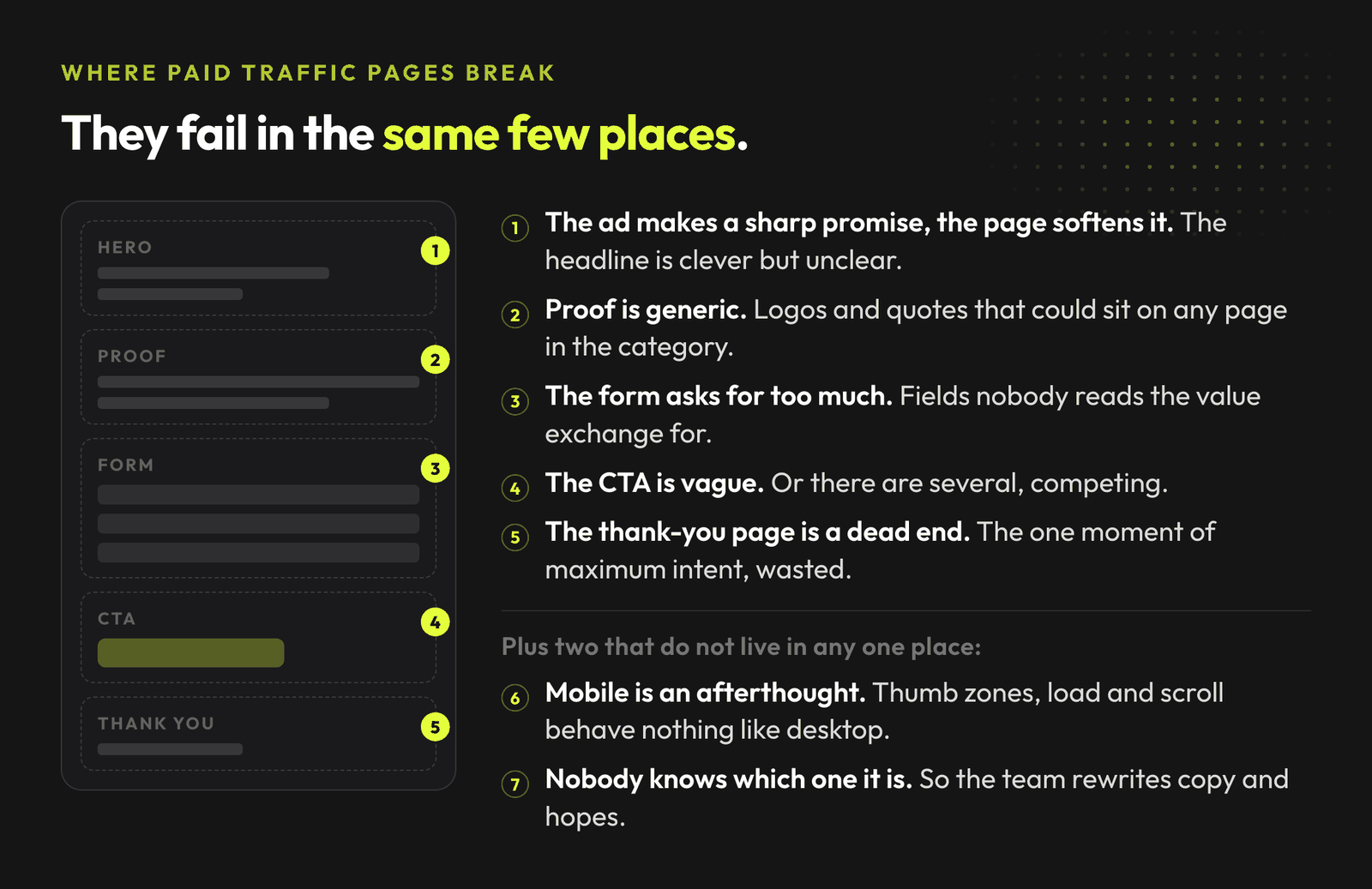
Paid traffic landing pages fail in predictable ways.
Join the waitlist and get notified when the new AdLume is ready. It catches wasted ad spend automatically and optimises campaigns around the clock.
One email, on the day access opens. Nothing else, and you can leave the list with one click.
When a landing page underperforms, most teams guess. They rewrite copy, swap images, or add more fields. Sometimes they run an A/B test without knowing what hypothesis they are actually testing.
A better approach: diagnose first.
So I built a pack for paid traffic landing pages: 26 Claude Skills for landing page diagnosis. Free, open source, and built for marketers who want to fix the right conversion leaks.
Get all 26 landing page skills on GitHub ->
A Claude Skill is a self-contained workflow. It has YAML frontmatter that tells Claude when to activate, and a Markdown body that defines the job: required inputs, analysis workflow, output format, decision rules, and guardrails.
That matters for landing pages because generic prompting breaks fast. You need the agent to know what the ad promised, what the visitor sees first, what counts as evidence, and what a real conversion leak looks like versus a design preference.
The skills in this repo are designed to work with URLs, screenshots, ad copy and analytics today. If you have heatmaps or test data, even better. The first version does not require write access or any promise that AI will design pages for you.
# | Skill | What it does |
|---|---|---|
1 | Paid Traffic Message Match Audit | Finds the first point where the ad promise and the page stop agreeing. |
2 | Above The Fold Clarity Review | Judges what a visitor understands and can do before scrolling. |
3 | Offer Clarity Diagnosis | Tests whether the offer is specific enough to be believed. |
4 | Hero Section Diagnosis | Reads headline, subhead, visual and CTA as one argument and finds the contradiction. |
5 | Social Proof Strength Audit | Checks whether the proof would convince a sceptic in the reader's own situation. |
6 | Objection Map Builder | Pulls real objections out of reviews, tickets and calls, and maps each to a section. |
7 | Form Friction Finder | Finds what stops people finishing a form they meant to finish. |
8 | Mobile Conversion Review | Diagnoses what breaks on a phone specifically, viewport by viewport. |
9 | CTA Clarity Check | Counts the commitments the page asks for and unifies the labels. |
10 | Trust Signal Audit | Checks whether a cautious buyer's questions are answered at the ask itself. |
11 | Conversion Leak Finder | Traces every way to leave the page without converting. |
12 | Page Speed Impact Review | Turns a speed report into one prioritised fix, ranked by traffic exposure. |
13 | Thank You Page Opportunity Audit | Looks at the highest-intent moment in the funnel, where pages usually say nothing. |
14 | Landing Page AB Test Readout | Decides whether a result is a decision or a coincidence. Ships a significance script. |
15 | Landing Page Scale Readiness Check | Checks whether the page survives the budget going up, before it goes up. |
16 | Pricing Page Clarity Review | Checks whether a visitor can pick a plan without contacting anyone. |
17 | Lead Form Sales Handoff Check | Audits every field against what sales actually uses to qualify. |
18 | Landing Page Copy Readability Pass | Measures which sentences slow the reader down. Ships a measurement script. |
19 | Page Length Fit Check | Answers page length in objections per ask, and refuses to answer in word counts. |
20 | Comparison Page Positioning Review | Finds the competitor claims that will not survive being checked. |
21 | Trial Vs Demo Path Decision | Decides which ask the page should make, based on time to first value. |
22 | Popup And Overlay Timing Review | Finds which overlay is stealing the primary conversion. |
23 | Accessibility Conversion Blocker Check | Finds the accessibility defects that also cost money. Ships a WCAG contrast script. |
24 | Google Ads Landing Page Experience Review | Separates a page problem from a keyword-mapping problem behind a Below average rating. |
25 | Traffic Temperature Match Review | Shows what one page costs you when it serves cold and branded traffic at once. |
26 | Landing Page Triage | The start-here router. Asks five questions and names at most three skills to run. |
Start with Landing Page Triage. It runs no diagnosis of its own: it asks five questions to establish what evidence you actually have, then names at most three skills to run in order, and says which ones it is deliberately skipping and why. Twenty six skills produce twenty six opinions ranked by nothing, which is the problem triage exists to prevent.
Each skill is data-first. They expect landing page URLs, screenshots, ad copy, heatmaps, form analytics, page speed reports, mobile screenshots and A/B test results. If the data is missing, the skill says so.
That is the point. Landing page work gets risky when AI recommends redesigns without evidence.
Clone the repo and copy the skill folders into your project's .claude/skills/ directory, or into ~/.claude/skills/ for user-level access.
git clone https://github.com/mardab96/landing-pages-claude-skills.git
mkdir -p ~/.claude/skills
cp -r landing-pages-claude-skills/*-* ~/.claude/skills/
Each skill is plain Markdown with YAML frontmatter. Paste the relevant SKILL.md file into context when you want to use it.
You describe the problem in normal language, and the skills that match it activate on their own.
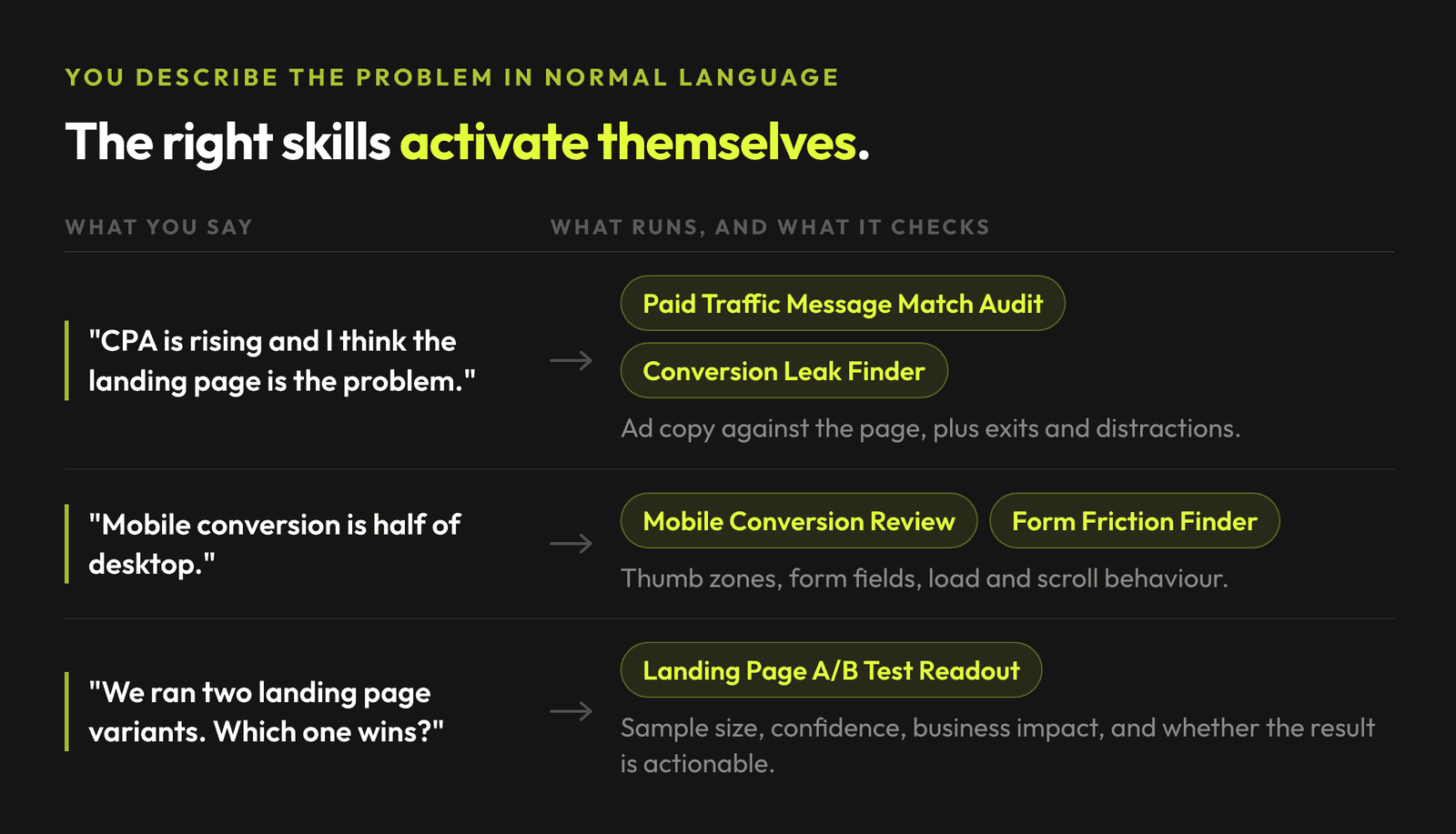
The skills work best with actual inputs. Recommended inputs:
If you only have a URL, start with a URL. The output will have lower confidence and a missing data section.
Landing pages sit at the moment of truth. A visitor clicked because something in the ad matched a need. The page either confirms that promise or breaks it. Small changes can help or hurt conversion. Big redesigns can destroy what was already working.
The full library of AdLume skills: paid ads, landing pages, B2B leads, GTM tracking, e-commerce.
The bundle goes straight to your inbox, then one email a week. Unsubscribe in one click. We never share your address.
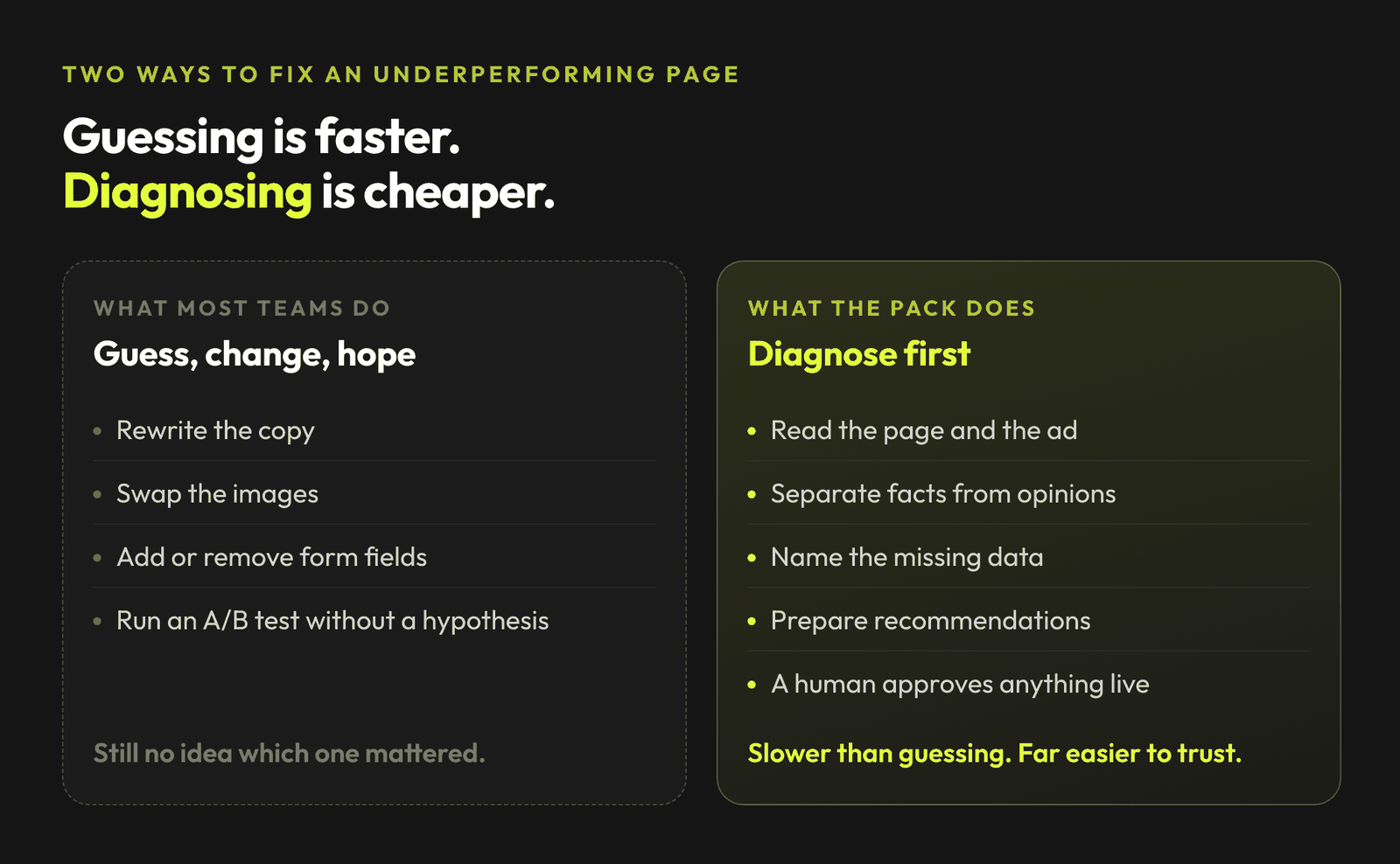
That workflow is slower than guessing. It is also much easier to trust.
The Paid Traffic Message Match Audit skill compares:
Then it flags mismatches that create cognitive friction. For example, an ad that promises a "free ROI calculator" but lands on a generic "Book a demo" page.
The output is a table with one row per promise, and these columns:
The Form Friction Finder skill looks at:
It does not just say "reduce fields." It identifies which fields are likely costing conversions and which fields may actually improve lead quality.
The skills do not:
They are built for diagnosis and approval-ready recommendations. If your landing page workflow already runs through a senior operator, these skills make recurring checks easier to repeat. If your workflow is a mess of opinions and untested redesigns, this gives you a cleaner starting point.
Three practical ways to use the repo:
If you also run broader paid ads, sell through an online store, or need the tracking underneath these audits, the companion packs are:
The broader shift is simple: landing page work is becoming a set of repeatable AI-assisted diagnostics. The teams that win will keep the messy human parts visible: customer context, proof, objections, tradeoffs, approvals, and the reason behind each change.
A language model asked to judge whether a conversion rate difference is noise will produce a confident sentence and no number, and a plausible number is indistinguishable from a measured one once it is in a document. So three of these skills carry their own arithmetic:
significance.py runs a two-proportion test with Wilson intervals, the sample size needed to decide, and the smallest difference detectable at the sample you have. It exits non-zero when the result is inconclusive, so it can gate a decision rather than decorate one.
contrast_check.py computes WCAG 2.1 contrast ratios and refuses translucent colours instead of scoring invisible text as a pass.
readability_report.py counts sentence mechanics, hedges and intensifiers, and can diff two versions of the copy. It refuses to adjudicate a mean under ten sentences.
All three are stdlib-only Python 3 and live inside the skill that uses them, so an installed skill never points at a file the install command forgot to copy.
Some numbers in the pack carry a real source and are cited: 4.5:1 and 3:1 contrast are WCAG 2.1 AA, 44 by 44 points is Apple's guidance, 48 by 48 density-independent pixels is Google's.
Others are the pack's own working defaults with no external source at all: the 35-word long-sentence flag, the 20-word mean, the 25th percentile scroll cutoff, and the 100 conversions per arm over seven days before an A/B result is allowed to name a winner. They are useful starting positions and they are not research. Every skill that quotes one says which of the two kinds it is, because a made-up threshold presented as a standard is how a diagnosis becomes confidently wrong.
AdLume watches your ad accounts and brings the next fix to your team's tools.
One email, on the day access opens. Nothing else, and you can leave the list with one click.
A Claude Skill is a self-contained workflow: YAML frontmatter tells Claude when to activate, and a Markdown body defines inputs, diagnostic steps and output format. You describe a problem in normal language and the right skill activates.
They review. Skills like Hero Section Diagnosis and Above-the-Fold Clarity Review assess headline, subheadline, visual and primary CTA as one unit, and tell you what a visitor understands in the first three seconds. They produce a ranked, evidence-backed list of what to change. Writing the new copy and designing the new page is still your call.
Yes. All 26 skills are free and open source on GitHub, MIT licensed. Clone the repo, then copy the skill folders into ~/.claude/skills/ or into your project's .claude/skills/ directory.
They work best with real inputs: landing page URLs, screenshots, ad copy, heatmaps, form analytics and page speed data. If you only have a URL, start with a URL; the output will have lower confidence and the skill will say so.
No. They are diagnostic-first: they identify the conversion leak, rank it and produce approval-ready recommendations. Redesign decisions stay with you.
Yes. All 26 skills run in Claude Code and activate on their own when what you are doing matches their description. They also work in other Claude environments, such as the desktop and web apps, where you paste the SKILL.md into context. Installation for both paths is covered above.
Three of them also ship a small Python script inside their own folder, for the parts that are arithmetic rather than judgement: an A/B significance test, a WCAG contrast calculator and a copy readability measurement. They are standard library only and need nothing installed.
Yes, that is what the pack is built for. Each skill is diagnostic-first: it inspects one part of a live page, such as message match, hero clarity, form friction, trust signals or CTA, and reports what to fix with evidence. It reviews an existing page rather than generating a new one.
They cover the parts of a page that decide conversion: paid traffic message match, above-the-fold and offer clarity, the hero section, social proof and trust signals, objections, form friction, mobile conversion, CTA clarity, conversion leaks, page speed, the thank-you page, A/B readouts and scale readiness.
Ten more cover the decisions behind the page: pricing clarity, whether each form field earns its place, copy readability, page length, comparison pages, trial versus demo, popup timing, accessibility blockers, the Google Ads landing page experience rating and traffic temperature. A twenty-sixth skill, Landing Page Triage, asks five questions and routes you to at most three of the others, so you do not run all twenty six at a page.
All 26 sit in one public repo: github.com/mardab96/landing-pages-claude-skills, MIT licensed. Each skill is its own folder with a SKILL.md inside, so you can open one file and read it before running anything. Clone the repo and copy the folders you want into .claude/skills, or paste a single SKILL.md into any Claude conversation.
Join the waitlist and get notified when the new AdLume is ready. It catches wasted ad spend automatically and optimises campaigns around the clock.
One email, on the day access opens. Nothing else, and you can leave the list with one click.