
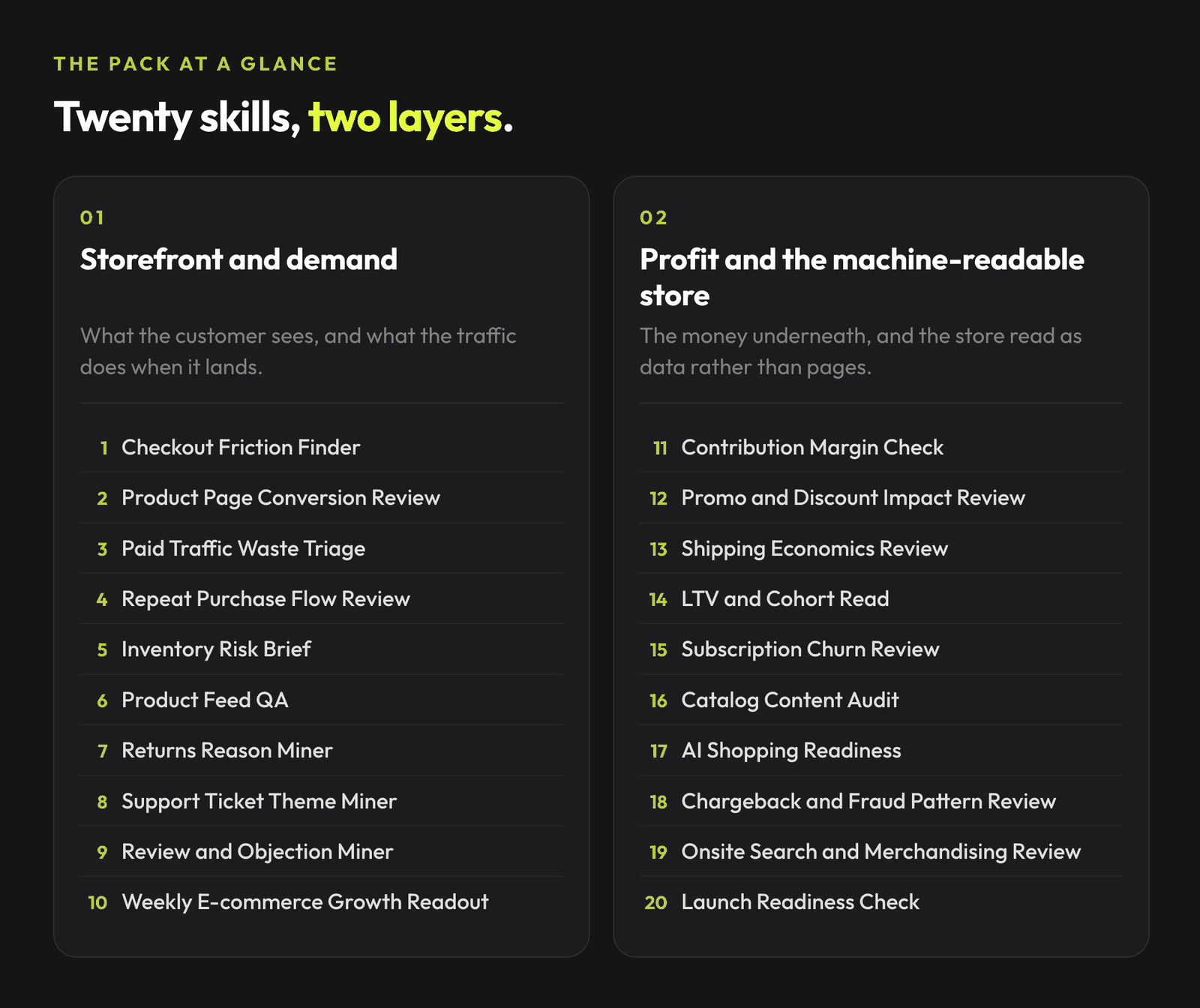
Twenty free skills for the store work that comes back every week, from checkout friction to margin per SKU.
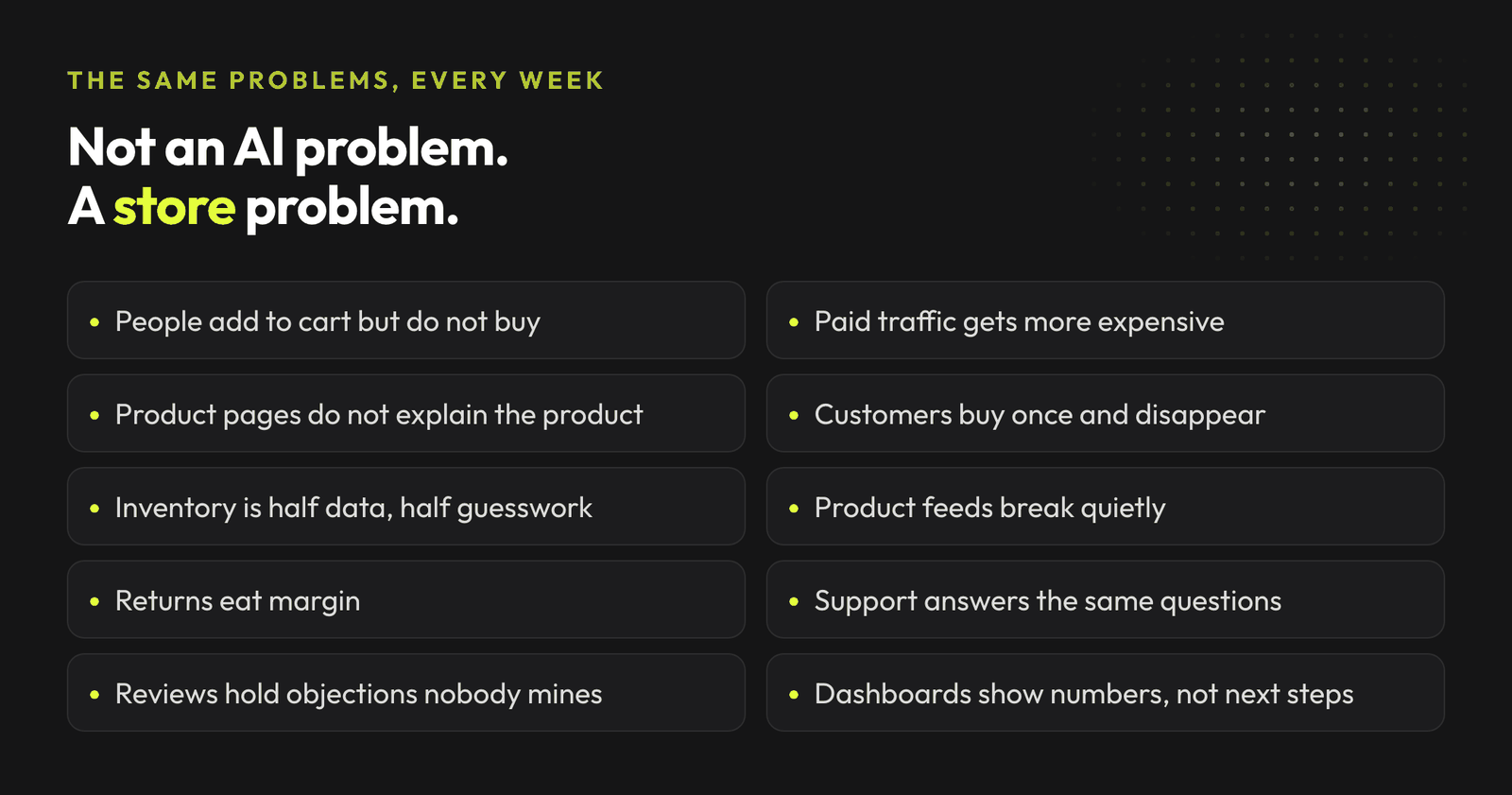
Most e-commerce operators do not need another generic AI prompt list. They need help with the same problems that keep showing up in the store every week.
Join the waitlist and get notified when the new AdLume is ready. It catches wasted ad spend automatically and optimises campaigns around the clock.
One email, on the day access opens. Nothing else, and you can leave the list with one click.
So this is not a list of "AI ideas for e-commerce." It is a practical set of Claude Skills for recurring store work.
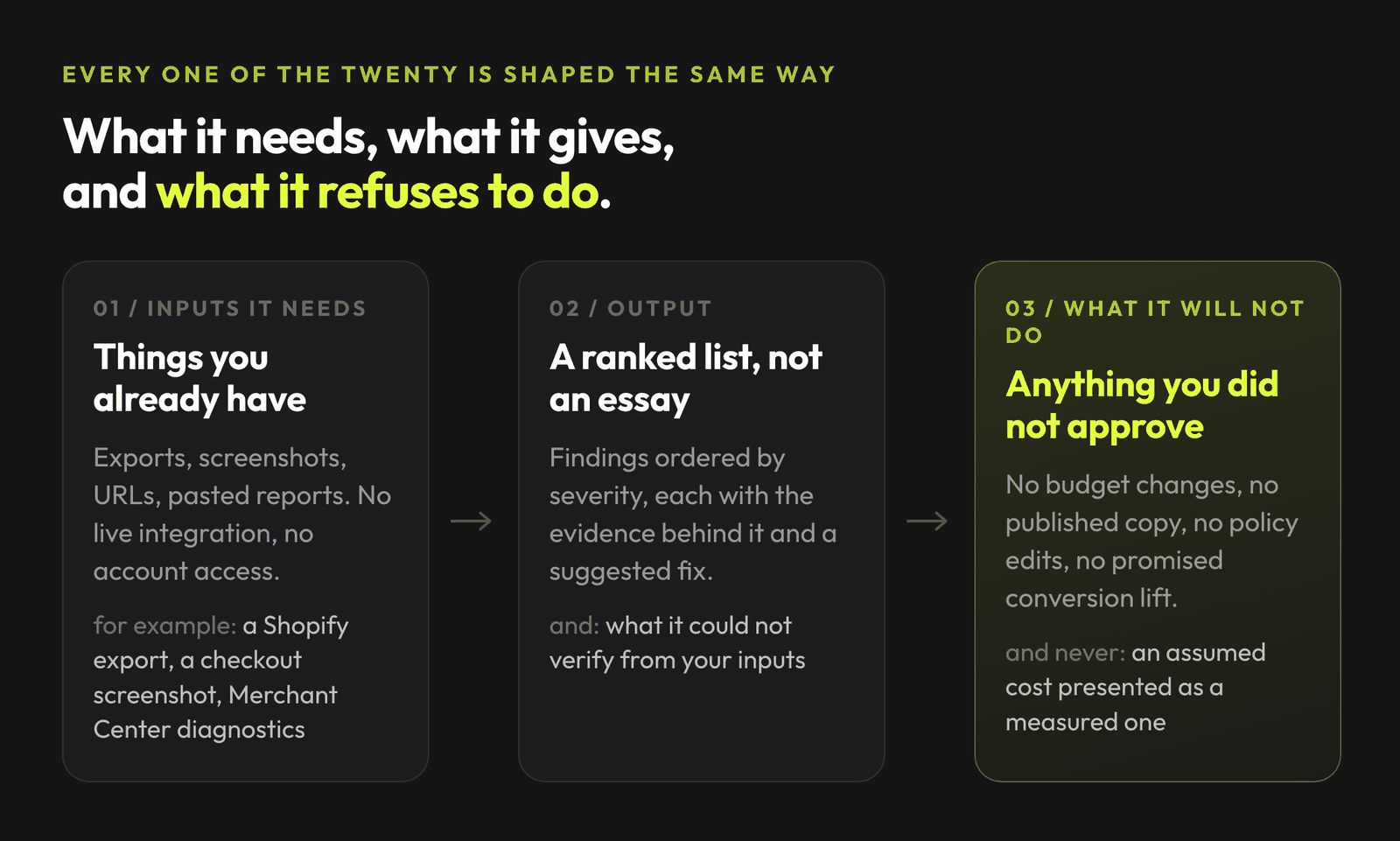
The repo is live and none of the skills require live integrations. Every one works from inputs a store owner or marketer can actually provide: Shopify exports, product page URLs, screenshots, Google Merchant Center diagnostics, Klaviyo flow reports, support tickets, reviews, ad exports, inventory CSVs and analytics summaries.
No fake autopilot. No "AI will fix your store" fantasy. Just bounded workflows that help you inspect the store, find the issue, and decide the next move.
Get all 20 skills on GitHub ->
The repo also includes copy-paste prompts, synthetic demo outputs, quick-start playbooks, and a shared output standard with evidence tags, confidence, impact, effort and owner decisions.
The pack started at 10 skills, and all 10 of them looked at the storefront: the product page, the cart, the feed, the traffic. That is where store diagnosis usually starts, and it is also where it usually stops. Skills 11 to 20 cover the two things the first version could not answer.
The money underneath the store. Margin per SKU after every variable cost, what a promo actually earned, what shipping really costs, what a customer is worth over time, and what is behind a rising dispute rate. Most stores measure their storefront carefully and estimate their economics.
The store as data rather than as pages. A catalog reviewed at scale instead of one product at a time, internal search treated as demand signal, and whether a machine reading the store gets the price, the availability and the return policy right.
Claude Skills are useful when a task repeats, follows a pattern, and needs guardrails. E-commerce has a lot of that.
A checkout audit should always check shipping cost visibility, account creation friction and trust signals. A product page review should always look at above-the-fold clarity, images, specs and sizing. A feed audit should always check price, availability, GTINs, titles, descriptions, images and landing pages.
You do not want to remember that checklist every time. You want it captured once, versioned, and reused. That is the point of a skill.
Clone the repo and copy the skill folders into your user-level skills directory:
git clone https://github.com/mardab96/ecommerce-claude-skills.git
mkdir -p ~/.claude/skills
cp -r ecommerce-claude-skills/*ecommerce* ~/.claude/skills/
Then start a new Claude Code session. Skills activate automatically when their description matches what you are doing, and you can always name one directly.
Each skill is plain Markdown with YAML frontmatter. If you are not using Claude Code, open the relevant SKILL.md file and paste it into context with your export, screenshot, URL, or report.
If you want the product layer instead of maintaining your own skill library, join the AdLume waitlist.
Baymard's checkout research keeps pointing to the same basic truth: many checkout losses are not mysterious. Shoppers leave because the final cost changes, delivery looks too slow, the site feels untrusted, account creation is forced, or the process takes too much work.
This skill reviews your checkout path and looks for those known friction points.
Inputs it needs.
Output.
What it should not do. It should not promise conversion lift. It can identify likely friction and prioritize fixes, but the store still needs to test the change.
The product page is where the buyer decides if the product is right for them.
Baymard's product page research shows that many e-commerce sites still underperform on product information, imagery, layout, reviews, and decision support. This is exactly the kind of review that benefits from a repeatable skill.
Inputs it needs.
Output.
What it should not do. It should not rewrite the whole product page from imagination. Good PDP work depends on product facts, customer language, and real objections.
Many e-commerce stores treat paid traffic as an ad account problem.
Sometimes it is.
But a paid traffic issue can also be a product page problem, an offer problem, a tracking problem, a feed problem, or a margin problem.
This skill looks at the relationship between ad performance and store performance so you do not keep optimizing the wrong layer.
Inputs it needs.
Output.
What it should not do. It should not change budgets, pause campaigns, or declare winners without human approval. It prepares the triage, not the live account action.
If the triage points at the ad account itself rather than the store, the paid ads skill pack covers that layer in more depth.
Acquisition is expensive. Retention is where many e-commerce stores have hidden leverage.
Shopify's retention material highlights how repeat customers can drive a disproportionate share of revenue and orders. Klaviyo's benchmark tooling also reflects how important lifecycle flows have become: welcome, abandoned cart, post-purchase, win-back, and related automations.
This skill reviews whether your store has a credible path from first purchase to second purchase.
Inputs it needs.
Output.
What it should not do. It should not invent lifecycle strategy without product cycle data. A coffee brand, skincare brand, furniture store, and fashion store do not have the same repeat-purchase logic.
Inventory problems are growth problems.
If bestsellers go out of stock, paid traffic sends demand into a wall. If slow movers pile up, cash gets trapped. Shopify's inventory guidance frames overstocking and understocking as a recurring operational risk, especially around seasonal spikes, promotions, and disconnected systems.
This skill turns an inventory export into an owner-level risk brief.
Inputs it needs.
Output.
What it should not do. It should not replace demand forecasting software. It is a practical review layer for stores that need a clearer weekly view.
For e-commerce, the product feed is not admin work. It is distribution.
Google Merchant Center documents how product data quality issues can cause warnings, limited performance, product disapprovals, or account-level problems. Common issues include product identifiers, price mismatch, availability mismatch, and landing-page inconsistencies.
This skill checks your feed before those problems quietly hurt Shopping or catalog performance.
Inputs it needs.
Output.
What it should not do. It should not guarantee approval. It can help diagnose and organize fixes, but Merchant Center enforcement remains Google's decision.
Returns are not just a cost line. They are feedback.
NRF estimated that 19.3% of online sales would be returned in 2025. For many categories, return reasons point directly to fixable problems: unclear sizing, poor product expectations, shipping damage, wrong images, weak descriptions, or quality issues.
This skill mines return data for patterns.
Inputs it needs.
Output.
What it should not do. It should not recommend harsher return policies as a default. A return problem can be a product clarity problem, not only a policy problem.
Repeated support questions are a store roadmap.
If customers keep asking "where is my order?", "which size should I buy?", "does this work with X?", or "how do I return it?", the store is missing information somewhere.
Zendesk and Gorgias both show the same broader direction in customer experience: support teams need context, better resolution loops, and automation around recurring questions. This skill helps find those recurring questions before automation is added.
Inputs it needs.
Output.
What it should not do. It should not write customer-facing replies without review. Support tone, policy, and edge cases need human approval.
Reviews are not only social proof. They are customer research.
Bazaarvoice's 2026 Shopper Experience Index (Volume 20, published June 2026) found that 97% of shoppers now consult multiple sources before buying, slowing the decision down and putting more weight on reviews at exactly the point this skill mines them. For store owners, reviews also contain the language customers use to explain what mattered, what confused them, and what almost stopped the purchase.
This skill turns reviews into usable marketing and product insight.
Inputs it needs.
Output.
What it should not do. It should not fabricate testimonials or rewrite reviews as if they were approved quotes. Use review mining for insight unless you have permission and the right display format.
The full library of AdLume skills: paid ads, landing pages, B2B leads, GTM tracking, e-commerce.
The bundle goes straight to your inbox, then one email a week. Unsubscribe in one click. We never share your address.
Most store dashboards show too many numbers and too little judgment.
Salesforce's Shopping Index and similar commerce dashboards track the obvious metrics: traffic, conversion, AOV, order growth, cart abandonment, device trends, and channel performance. The hard part is turning those metrics into one weekly owner-level view.
This skill creates that readout.
Inputs it needs.
Output.
What it should not do. It should not pretend to know causality from one dashboard screenshot. It should separate evidence from hypothesis.
A store can run at ROAS 3 and still end the month with nothing in the account.
That usually is not a media problem. It is a cost stack nobody has ever assembled: discounts, returns, payment fees, platform fees, carrier surcharges, packaging, and only then ad spend.
This skill builds that stack per SKU and reports margin before ad spend and margin after ad spend as two separate numbers. A product that loses money before a single ad runs is a pricing problem. A product that only loses money after acquisition cost is a media problem. Stores fix the wrong one constantly because they see one blended figure.
Inputs it needs.
Output.
What it should not do. It should not present an assumed cost as a measured one. Any cost you did not supply is an assumption, and a margin model built on assumed landed cost is worse than no model, because you will act on it.
A promo week that beats an ordinary week is not evidence that the promo worked.
The question is what happened to the weeks around it, how much margin went out the door, and whether the list learned to wait for the next discount.
This skill compares the promo window against a baseline you define, prices the margin actually given away, and checks the trough after the peak for pull-forward.
Inputs it needs.
Output.
What it should not do. It should not credit the discount with lift that came from a budget increase. If ad spend rose during the promo, the skill has to say so before attributing anything to the mechanic.
Most free-shipping thresholds were copied from a competitor and never recalculated.
Meanwhile the real cost of delivery moves with weight, zone, fuel, oversize handling, residential delivery and address corrections, and most of those land on the carrier invoice rather than in the store's reporting.
This skill compares what you charge against what you pay, by zone and by order value band, and tests the threshold against your actual AOV distribution instead of against a rule of thumb.
Inputs it needs.
Output.
What it should not do. It should not hand you projected savings as if they were guaranteed. Every scenario is a model, and the assumptions behind it have to stay visible.
What a first order can cost depends on what happens after it.
The useful outputs here are narrower than a lifetime value number: the share of customers who come back at all, the median time to the second order, and the point after which a customer who has not reordered almost never will. That last one is the window every retention flow should target, and most stores have never measured it.
This skill builds cohorts from an order export and compares them by acquisition source, first product, and whether the first order was discounted.
Inputs it needs.
Output.
What it should not do. It should not project a curve past the data it has. If only two cohorts have reached 365 days, that is what the output says, and comparisons between small segments carry their sample size next to them.
A single churn number hides the most fixable part of the problem.
Failed cards, expired cards and thin dunning are a billing problem. Cancellations because the product arrives faster than anyone uses it are a frequency problem. Cancellations because the flow offers no skip, no delay and no smaller quantity are a design problem. Only some of that is about the offer.
This skill splits survival by cycle into voluntary churn, involuntary churn and paused-not-resumed before it interprets anything.
Inputs it needs.
Output.
What it should not do. It should not suggest making cancellation harder. Hiding the exit moves the same customer into a chargeback. Fix the reason instead.
Reviewing a product page is a solved problem. Reviewing 800 of them is not.
Past a few hundred SKUs, content quality stops being a writing task and becomes a coverage question: which categories are thin, where is supplier copy duplicated word for word across every reseller, and which missing attributes will fail a feed or a marketplace before anyone reads a description.
This skill scores the whole catalog against one spec, clusters the gaps, and ranks them by revenue rather than alphabetically.
Inputs it needs.
Output.
What it should not do. It should not fill a missing specification from assumption. Materials, dimensions, compatibility and certifications are facts or they are needs_data. There is no third option.
Your store is now being read by machines, and almost nobody set it up for that.
Three standards cover different layers of agentic commerce: UCP from Google and Shopify supports product discovery and checkout interactions; ACP from OpenAI and Stripe supports agentic checkout; AP2, donated to the FIDO Alliance in April 2026, specifies transaction-bound mandates for authorised agent payments. UCP documentation describes how UCP and AP2 can work together. This skill checks the data and policy information your platform and payment provider expose today.
The work underneath is boring and worth doing either way. Does your markup expose the real variant price or only the lowest one. Is your return window text a machine can parse, or a picture of text. Do your identifiers exist. That is what gets checked, with the date it was checked, because vendor documentation moves faster than any checklist.
Inputs it needs.
Output.
What it should not do. It should not promise visibility, ranking or inclusion on any AI surface. Nobody controls that, and anyone selling certainty about it is guessing.
A rising dispute rate is usually read as a fraud problem and treated by tightening rules.
That is often the wrong move, because a large share of disputes are service failures wearing a fraud reason code: a delivery that never arrived with tracking nobody captured, a bank statement descriptor showing a legal entity name the customer does not recognise, or a subscription that was hard enough to cancel that disputing was easier.
This skill splits disputes into genuine fraud, service failure and friendly fraud, then traces the service-failure share back to its operational cause.
Inputs it needs.
Output.
What it should not do. It should not give legal or card-scheme advice, and it should not treat a reason code as proof of what happened. A reason code is what the customer claimed.
The best demand data most stores own is the search box on their own site, and almost nobody reads it.
Every zero-result search is a visitor who was ready to buy something and found nothing. Some of those are products you do not stock, which is an assortment question. Most of them are products you do stock under a name your customers do not use, which is a fifteen-minute fix.
This skill separates the two, because they get treated identically and they are not the same problem.
Inputs it needs.
Output.
What it should not do. It should not turn query volume into a sales forecast, and it should not tell you to order stock against a cluster before checking whether you already sell the same thing under another name.
The expensive launch failures are never exotic.
A promo code that stacks with the welcome code and takes two SKUs below cost. A back-in-stock flow firing at the same list on the same morning as the launch email. Tracking that worked last month and was never tested on the launch items. Stock that covers the plan but not three times the plan.
This skill walks eight layers before traffic arrives and returns a go, go-with-conditions, or hold, with the conditions owned by a name and a time.
Inputs it needs.
Output.
What it should not do. It should not mark a layer ready because nobody raised a problem. Unverified is needs_data, and silence is not a pass.
Pick the skill that matches the store problem.
Then give Claude the right input.
For example:
Use the Checkout Friction Finder.

Store: Shopify apparel brand.
Goal: Find likely checkout friction before we increase paid spend.

Inputs:
- cart screenshot
- checkout screenshots
- shipping policy
- last 30 days checkout funnel
- top 20 support questions about shipping and returns

Output:
- ranked friction list
- recommended fixes
- what to test after each fix

Do not rewrite live copy.
Do not recommend discounts unless the evidence points to price or shipping cost friction.
The important part is the constraint.
Claude is useful when the task is bounded. It is less useful when you ask it to "improve the store" with no data, no scope, and no definition of done.
Want this kind of weekly diagnostic loop without assembling it from Markdown files? Join the AdLume waitlist.
A good e-commerce skill has five parts:
That is why these are skills, not prompts.
Prompts are easy to copy.
Skills are easier to repeat.
AdLume watches your ad accounts and brings the next fix to your team's tools.
One email, on the day access opens. Nothing else, and you can leave the list with one click.
No. The examples are Shopify-friendly because many e-commerce operators use Shopify, but the skills can work with WooCommerce, BigCommerce, Magento, custom stores, and CSV exports.
No live integration is required. They are designed to work with exports, screenshots, links, and pasted reports. Live integrations are possible later, but exports keep the first version simple and safer.
No. They should prepare the analysis and recommendations. Anything public, live, paid, or policy-sensitive should stay approval-gated.
No. Paid traffic is one skill. The rest cover product pages, checkout, retention, inventory, product feeds, returns, support, reviews, and weekly decision-making.
Yes, but the pack is written for e-commerce owners and operators first. Agencies can adapt the outputs into audits, weekly reports, and client action plans.
No. The first version works from exports, screenshots, URLs, pasted reports, reviews, tickets or store docs.
Because the work repeats and follows a pattern that needs guardrails. A checkout audit always checks the same things, so the checklist is worth capturing once and reusing.
No. They identify likely friction and prioritise fixes, but the store still needs to test the change.
Start with the problem you can already name. If paid traffic is getting more expensive, run Paid Traffic Waste Triage. If people add to cart and leave, run Checkout Friction Finder. If a product page gets traffic but few orders, run Product Page Conversion Review. If you cannot point at the leak yet, run the Weekly E-commerce Growth Readout first and let it tell you which of the other nine to open.
Mostly yes. The skills run on exports, product URLs, screenshots and reports, so they do not depend on how the order gets fulfilled. Product Feed QA, Product Page Conversion Review, Review and Objection Miner and Paid Traffic Waste Triage are usually where dropshipping stores find the most to fix. The Inventory Risk Brief is the weak one, because it assumes you control stock levels and lead times. If your supplier controls them, treat its output as questions for the supplier rather than reorder decisions.
Both. In Claude Code you copy the skill folders into your skills directory once, and they activate on their own when your request matches the description. Anywhere else, each skill is plain Markdown with YAML frontmatter, so you open the relevant SKILL.md file and paste it into the conversation together with your export, URL or screenshot.
Yes, and seven of the twenty are built for it. They read exports instead of plugging into a dashboard: LTV and Cohort Read (repeat rate, time to second order, payback window), Contribution Margin Check (per SKU, after COGS, fees, shipping, refunds and ad spend), Promo and Discount Impact Review (whether a sale added profit or just pulled demand forward), Subscription Churn Review, Shipping Economics Review, Returns Reason Miner, and the Weekly E-commerce Growth Readout, which folds store, analytics, ads, email and inventory exports into one owner readout. You bring the CSV, you get a read with the arithmetic shown.
No. Keep the dashboard for counting. These skills sit after it: you export the numbers it already shows, then ask what to change. Nothing here replaces GA4, Shopify reports or a BI tool, and nothing here writes back into them.
Start with an order export. Cohort and LTV work needs order dates and a customer identifier. Contribution Margin Check needs COGS, platform fees, shipping cost, refunds and ad spend. Subscription Churn Review needs a subscriber export with cancellation reasons. If a number is missing, the Weekly E-commerce Growth Readout names the gap rather than filling it with an estimate.
Start from a problem you can already name, then run the one skill that covers it. Product pages, checkout, feeds, returns, subscriptions, shipping cost, inventory and margin each have their own skill, and each reads an export rather than connecting to the store. If you cannot name the problem yet, run the Weekly E-commerce Growth Readout first and let it point at the area.
Join the waitlist and get notified when the new AdLume is ready. It catches wasted ad spend automatically and optimises campaigns around the clock.
One email, on the day access opens. Nothing else, and you can leave the list with one click.