
Twenty free diagnostic skills for paid ads, built to find the leak before anyone changes a budget.
Most paid ads AI workflows still start with a bad prompt.
Someone exports a report, pastes it into a chat, and asks:
Join the waitlist and get notified when the new AdLume is ready. It catches wasted ad spend automatically and optimises campaigns around the clock.
One email, on the day access opens. Nothing else, and you can leave the list with one click.
Analyze this paid ads account and tell me what to improve. You might get a decent answer once.
Then the mess starts.
Paid ads work rarely lives inside one platform. A Google Ads problem can be a landing page problem. A Meta Ads lead problem can be a CRM feedback problem. A scaling problem can be a tracking problem. A creative problem can be an offer problem. And a weekly report can hide the one decision that actually matters.
So I built a broader pack:
20 Claude Skills for paid ads operators.
Free. Open source. Built for marketers who want useful AI workflows without giving an agent control over spend.
Get all 20 paid ads skills on GitHub ->
A Claude Skill is a self-contained workflow.
It has YAML frontmatter that tells Claude when to activate, and a Markdown body that defines the job: required inputs, analysis workflow, output format, decision rules, and guardrails.
That matters in paid ads because generic prompting breaks fast.
You need the agent to know what to read, what to ignore, what is missing, what counts as evidence, and when a human has to approve the next step.
The skills in this repo are designed to work with exports and screenshots today. If you have live connectors later, you can adapt the same workflows to pull live data. The first version does not require write access, campaign mutation, or any promise that AI will manage ads for you.
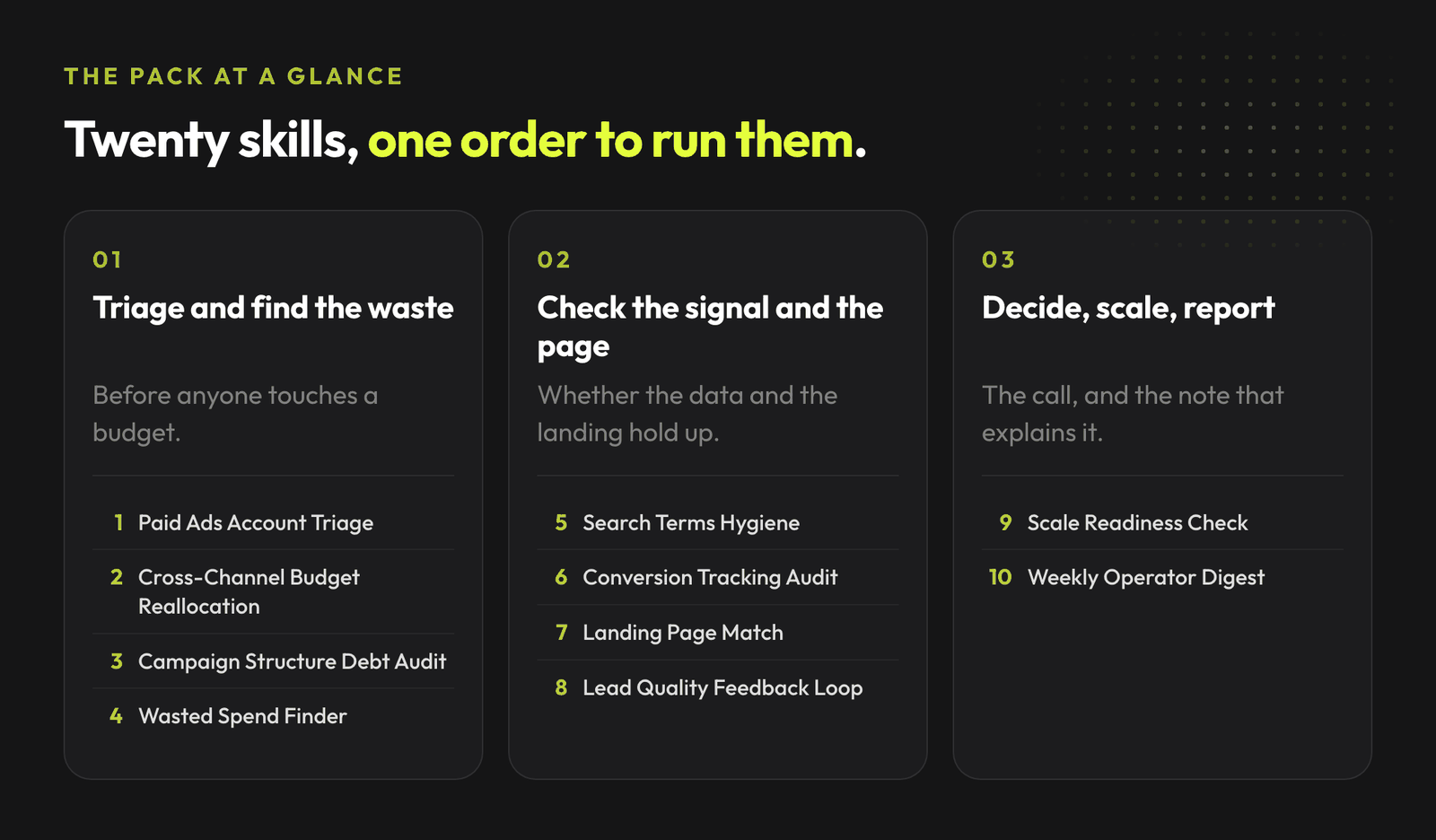
# | Skill | What it does |
|---|---|---|
1 | Paid Ads Account Triage | Finds the biggest paid ads issue before going deep into one platform |
2 | Cross-Channel Budget Reallocation | Decides where to add, hold, reduce, or pause spend across Google and Meta |
3 | Campaign Structure Debt Audit | Spots fragmentation, duplicated roles, stale campaigns, and mixed intent |
4 | Wasted Spend Finder | Finds spend that does not create the business result you care about |
5 | Search Terms and Intent Hygiene | Builds a search intent cleanup and negative keyword plan |
6 | Creative Fatigue and Angle Review | Separates tired creative from weak offers, poor traffic, or tracking noise |
7 | Landing Page Conversion Review | Reviews landing pages for paid traffic clarity, trust, offer match, and friction |
8 | Offer and Message Match Audit | Checks if ads, pages, forms, and follow-up sell the same promise |
9 | Tracking and Signal Quality Audit | Reviews conversion events, Pixel/CAPI, GA4/GTM, and optimization event fit |
10 | Lead Quality Feedback Loop | Connects platform leads to CRM or sales quality feedback |
11 | Performance Anomaly Explainer | Explains spikes and drops without overreacting to normal variance |
12 | Bidding and Learning Sanity Check | Checks if bid strategy and learning status match volume, budget, and signal quality |
13 | Performance Max Control Review | Diagnoses PMax without turning the whole pack into a PMax-only asset |
14 | Advantage Plus Control Review | Diagnoses Advantage+ without blaming automation by default |
15 | Product Feed and Catalog QA | Finds feed and catalog issues before Shopping or catalog ads take the blame |
16 | Comment and Objection Miner | Turns comments and objections into ad, landing page, and FAQ improvements |
17 | Competitor and Auction Pressure Review | Checks if worsening performance is driven by auction pressure or weak execution |
18 | Experiment Readout | Turns a paid ads test into a decision: scale, iterate, hold, or stop |
19 | Weekly Paid Ads Operator Readout | Produces a short weekly update with facts, hypotheses, next actions, and approvals |
20 | Scale Readiness Check | Decides if the account is ready for more budget or needs fixes first |
Each skill is data-first.
They expect exports, reports, screenshots, URLs, CRM notes, sales notes, comments, diagnostics, or weekly summaries. If the data is missing, the skill says so.
That is the point.
Paid ads work gets risky when AI sounds confident while the evidence is thin.
Clone the repo and copy the skill folders into your project's .claude/skills/ directory, or into ~/.claude/skills/ for user-level access.
git clone https://github.com/mardab96/paid-ads-claude-skills.git
mkdir -p ~/.claude/skills
cp -r paid-ads-claude-skills/*paid-ads* ~/.claude/skills/
Start a new Claude Code session. The skills activate automatically when their description matches what you are asking for.
Each skill is plain Markdown with YAML frontmatter. Paste the relevant SKILL.md file into context when you want to use it.
Each skill is plain Markdown with YAML frontmatter. Paste the relevant SKILL.md file into context when you want to use it.
You describe the problem in normal language.
"CPA rose last week and I do not know if this is creative fatigue, tracking, or auction pressure."
Claude can route to Performance Anomaly Explainer, Tracking and Signal Quality Audit, Creative Fatigue and Angle Review, or Competitor and Auction Pressure Review.
"We have cheap leads from Meta, but sales says they are bad."
Lead Quality Feedback Loop activates. It asks for platform lead volume, CRM status, sales notes, disqualification reasons, and source mapping.
"Can we increase spend next week?"
Scale Readiness Check activates. It reviews conversion quality, tracking confidence, creative capacity, landing page capacity, bidding stability, and business constraints.
The skills work best with actual exports.
Recommended inputs.
The full library of AdLume skills: paid ads, landing pages, B2B leads, GTM tracking, e-commerce.
The bundle goes straight to your inbox, then one email a week. Unsubscribe in one click. We never share your address.
If you only have screenshots, start with screenshots. The output will have lower confidence and a missing data section.
Paid ads are a money system.
A small change can move budget, reset learning, break reporting, push the platform toward worse leads, or make a founder think the wrong channel is working.
So the workflow should look like this:
That workflow is slower than pretending the agent is an autopilot.
It is also much easier to trust.
The Lead Quality Feedback Loop skill asks for 2 sides of the story:
Then it checks whether the issue is likely:
The output turns "lead quality is bad" into a decision path.
It returns a table with one row per issue, and these columns:
Lead issue
Evidence
Likely source
Business impact
Fix
Confidence
For example.
It returns a table with one row per issue, and these columns:
Lead issue | Evidence | Likely source | Business impact | Fix | Confidence |
|---|---|---|---|---|---|
Low qualification rate from one campaign | Meta shows low CPA, CRM notes show repeated "no budget" disqualification | Offer and targeting mismatch | Sales time wasted, platform learns from weak lead signal | Test stronger qualification in form and review optimization event | Medium |
That is the difference between a vague complaint and an account decision.
Scaling is usually where messy accounts get exposed.
The Scale Readiness Check skill looks at:
Then it returns one of 4 verdicts:
The useful part is the rollback plan.
If budget goes up and CPA rises by a defined threshold, lead quality drops, or conversion volume does not follow, the skill tells you what to watch and when to undo the change.
The skills do not.
They are built for diagnosis and approval-ready recommendations.
If your paid ads workflow already runs through a senior operator, these skills make recurring checks easier to repeat.
If your workflow is a mess of prompts, screenshots, and Slack threads, this gives you a cleaner starting point.
Three practical ways to use the repo:
If you only run one platform, you may also want the companion packs:
The broader shift is simple: paid ads work is becoming a set of repeatable AI-assisted workflows.
The teams that win will keep the messy human parts visible: business context, signal quality, tradeoffs, approvals, and the reason behind each change.
AdLume watches your ad accounts and brings the next fix to your team's tools.
One email, on the day access opens. Nothing else, and you can leave the list with one click.
A self-contained workflow: YAML frontmatter tells Claude when to activate, and a Markdown body defines required inputs, analysis workflow, output format, decision rules and guardrails.
No. The first version works with exports and screenshots. If you connect live data later, you can adapt the same workflows.
No. The pack is built for marketers who want useful AI workflows without giving an agent control over spend. Skills diagnose and recommend; humans approve.
Start with screenshots. The output will have lower confidence and include a missing data section rather than pretending the evidence is complete.
Join the waitlist and get notified when the new AdLume is ready. It catches wasted ad spend automatically and optimises campaigns around the clock.
One email, on the day access opens. Nothing else, and you can leave the list with one click.