
Twelve free skills for LinkedIn Ads, including the CPL against CRM reconciliation that separates cheap leads from real pipeline.
LinkedIn Ads is not just expensive search with a different logo. It reaches buyers by job title, seniority, and company, it costs several times what other networks cost per click, and it reports leads that your sales team quietly throws away. Running it well is its own discipline, and generic paid-media advice does not cover it.
This is a free, open-source pack of 12 Claude Skills for running LinkedIn Ads like the pipeline channel it is supposed to be, not the form-fill machine it defaults to. Each skill is a self-contained SKILL.md file with explicit triggers, required inputs, an analysis workflow, decision rules, a worked example, and guardrails. Drop them into Claude and they activate when the conversation matches. Every skill is data-first: it reads the Campaign Manager export or the CRM numbers you give it, tells you when data is missing, stops at an approval-ready recommendation, and never touches your ad account.
Join the waitlist and get notified when the new AdLume is ready. It catches wasted ad spend automatically and optimises campaigns around the clock.
One email, on the day access opens. Nothing else, and you can leave the list with one click.
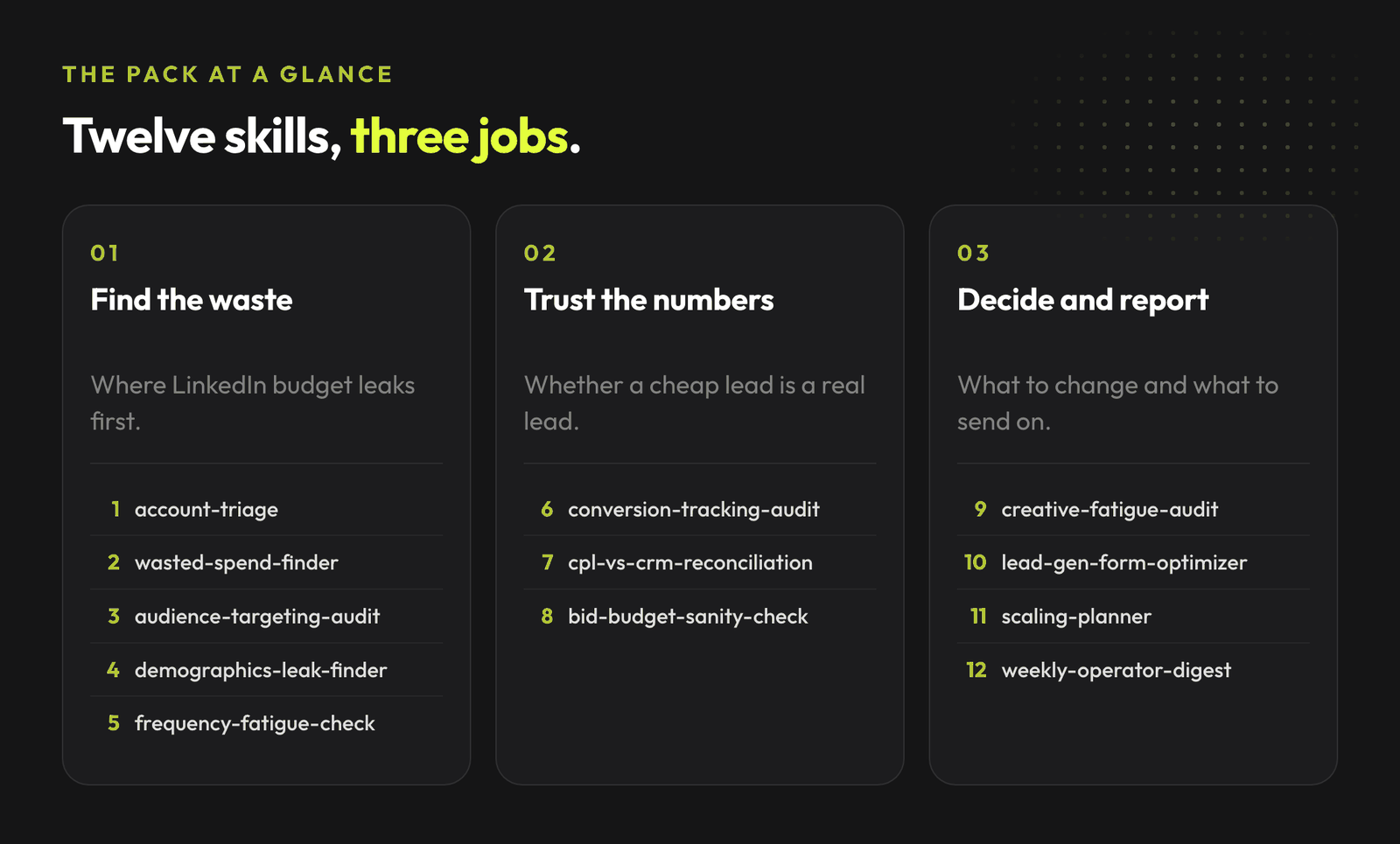
Three things make LinkedIn its own discipline, and this pack is built around them.
Cheap leads, zero pipeline. Campaign Manager celebrates a low cost per lead. Then sales works the list and most of it goes nowhere. The reconciliation skill joins LinkedIn-reported leads to your CRM stages so you see cost per qualified lead and cost per opportunity by campaign, then moves budget toward what produces pipeline. It also closes the loop by feeding your qualified stages back into LinkedIn through offline conversion import, so bidding learns to chase pipeline value instead of form-fill volume.
Budget delivered to the wrong people. A campaign can hit its target cost per lead on average while spending half its budget on seniorities and industries that will never buy. Averages hide it. The demographics report reveals it, and the demographics-leak-finder skill reads that report against your ICP and quantifies the reallocation pool.
Clone the repo and copy the skill folders into your Claude skills directory.
Get all 12 LinkedIn Ads skills on GitHub ->
git clone https://github.com/mardab96/linkedin-ads-claude-skills.git
mkdir -p ~/.claude/skills
cp -r linkedin-ads-claude-skills/*-linkedin-ads ~/.claude/skills/
Start a new Claude Code session and the skills activate automatically when their description matches what you ask. In other Claude environments, paste the relevant SKILL.md into context.
Start here.
The full library of AdLume skills: paid ads, landing pages, B2B leads, GTM tracking, e-commerce.
The bundle goes straight to your inbox, then one email a week. Unsubscribe in one click. We never share your address.
Diagnose.
Measure.
Optimise.
Plan and report.
Two skills lean on numbers you should not eyeball, so the pack ships deterministic helper scripts that do the arithmetic exactly. One reconciles cost per qualified lead across campaigns from your LinkedIn and CRM stage counts. The other reads a demographics export and quantifies off-ICP delivery, falling back to an impression-share proxy (clearly labeled) when LinkedIn omits per-slice cost.
# True cost per qualified lead per campaign, from LinkedIn plus CRM stages
python3 scripts/cpl-reconciliation.py campaigns.csv

# Off-ICP spend share from a Demographics export
python3 scripts/demographics-leak.py demographics.csv --icp "director,vp,cxo,owner"
Describe what you want in plain language and hand over the export. Some examples:
The skills do not log in and do not change anything live. They read what you give them and stop at a recommendation you approve and apply yourself.
Numeric thresholds in these skills are starting heuristics, not rules LinkedIn published. The 300-member audience floor and the 50,000-member recommendation are LinkedIn's own. Everything else (waste multiples, fatigue frequency, cost-per-lead targets) shifts by vertical, offer, sales-cycle length, and account maturity. Every skill says so and tells you when it adjusted a threshold and why. Treat any skill that hands you a confident number without stating its assumptions as one worth ignoring, including these.
If you run Google Ads too, there is a companion pack: 20 Claude Skills for Google Ads. The pack is free and MIT licensed, so use it, fork it, and adapt it to your own account.
AdLume watches your ad accounts and brings the next fix to your team's tools.
One email, on the day access opens. Nothing else, and you can leave the list with one click.
Yes. The pack is public on GitHub under an MIT license. Use, modify, and redistribute it for personal and commercial work.
No. Every skill is data-first and human-in-the-loop. You paste a Campaign Manager export or your CRM numbers, the skill reads them and returns a recommendation, and you apply the changes yourself. Nothing logs in or changes anything live.
Whatever the skill you are running asks for under its Required input section. Common inputs are the campaign performance export, the Demographics report, the conversions report, and your CRM stage counts for the reconciliation skills. CSV exports from Campaign Manager work fine.
It is built around what makes LinkedIn its own channel: the firmographic demographics layer, the gap between cheap reported leads and real pipeline, small-audience fatigue, Audience Expansion and Audience Network leakage, and native Lead Gen Forms. The judgment inside each skill reflects LinkedIn, not search.
No. The 300-member audience floor and the 50,000-member recommendation are LinkedIn's own. Every other threshold is a starting heuristic that shifts by vertical, offer, and account maturity, and each skill tells you when it adjusted one and why.
Join the waitlist and get notified when the new AdLume is ready. It catches wasted ad spend automatically and optimises campaigns around the clock.
One email, on the day access opens. Nothing else, and you can leave the list with one click.