
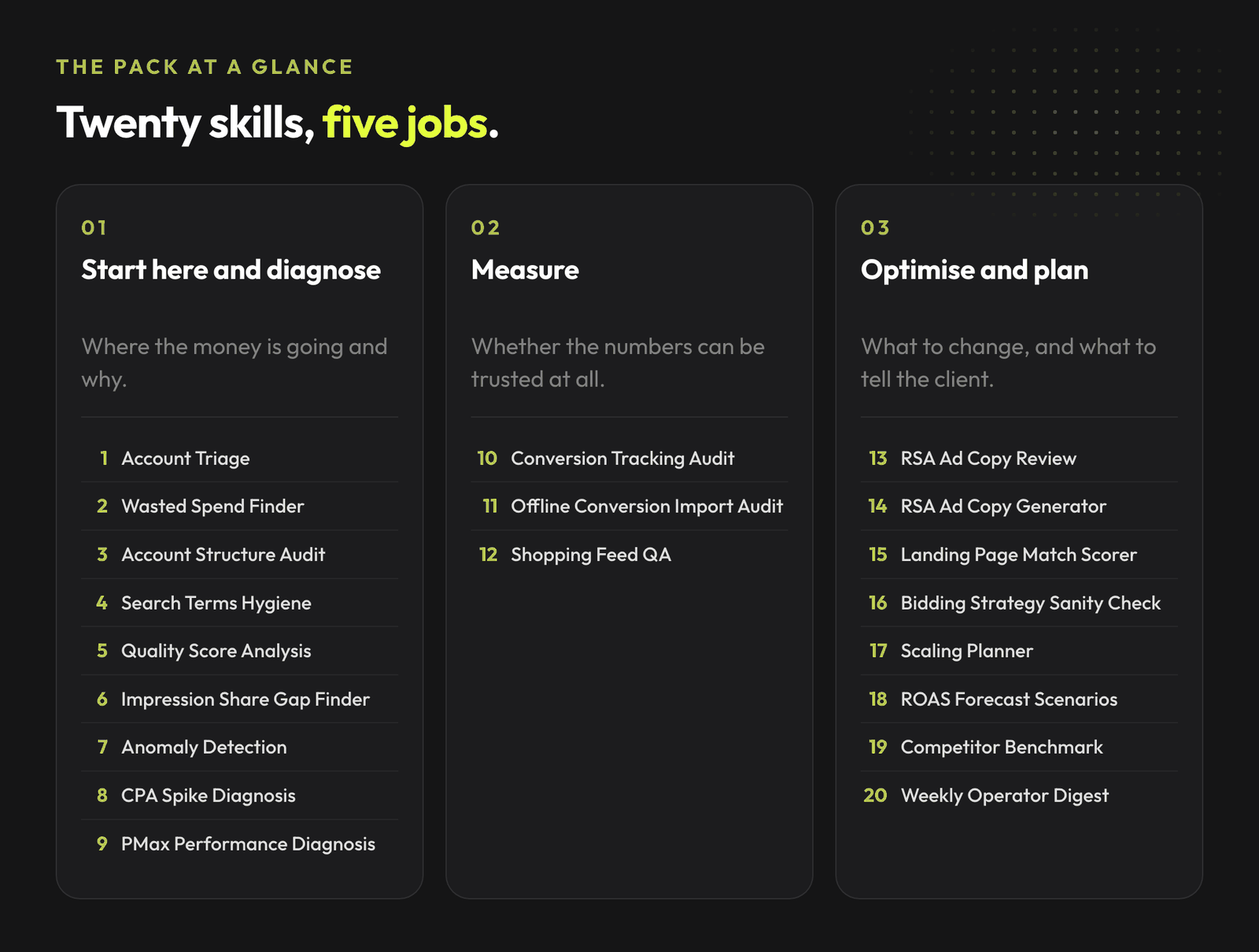
Twenty free Google Ads skills, grouped by what you are doing: diagnosing, measuring, optimising, or writing the report.
Most agencies running Google Ads with AI today have the same workflow: a Notion page full of prompts, a few Slack threads, someone's personal ChatGPT history, and a habit of copy-pasting the same instruction into a new chat every week.
That works until it doesn't. Prompts drift. Versions diverge. The new hire reinvents the wheel. The senior who wrote the original prompt left for another shop, and nobody remembers exactly how it went.
Join the waitlist and get notified when the new AdLume is ready. It catches wasted ad spend automatically and optimises campaigns around the clock.
One email, on the day access opens. Nothing else, and you can leave the list with one click.
We built a different way: 20 self-contained Claude Skills that handle the recurring diagnostics a performance marketer runs every week. They live in a repo, they version with git, and they auto-trigger inside Claude Code based on what you're actually asking for.
Free. Open source. Drop them in and they activate.
A Claude Skill is a Markdown file with YAML frontmatter that Claude reads at the start of a session. The frontmatter declares when the skill should activate. The body defines the workflow: required inputs, analysis steps, decision rules, output format, guardrails.
Once installed, you don't need to remember which skill to call. Describe your problem in natural language and Claude routes to the right one based on its description.
You can read more about how skills work in Anthropic's documentation.
Version 1 shipped 10 skills. Version 2 doubles the pack to 20 and closes three gaps that mattered more than the count.
The full library of AdLume skills: paid ads, landing pages, B2B leads, GTM tracking, e-commerce.
The bundle goes straight to your inbox, then one email a week. Unsubscribe in one click. We never share your address.
If you are new to the pack, run them in this order rather than picking at random.
Clone the repo and copy the skill folders into .claude/skills/ in your project, or into ~/.claude/skills/ for user-level access. Start a new Claude Code session and skills activate automatically when their description matches what you are asking.
git clone https://github.com/mardab96/google-ads-skills.git
mkdir -p ~/.claude/skills
cp -r google-ads-skills/*-google-ads ~/.claude/skills/
Each skill is plain Markdown with YAML frontmatter. Paste the relevant SKILL.md content into context when you want to use it. Works in Claude.ai, the API, or any environment where Claude can read text.
If you have the Google Ads MCP server connected, skills can query live data instead of CSV exports. For everyone else, exports from the Google Ads UI or Editor work fine.
You don't trigger skills with a command. You describe the problem. "Find wasted spend in this Google Ads account, here are the CSV exports from the last 60 days." → Wasted Spend Finder activates. Returns ranked segments and reclaim estimates. "Why did CPA spike yesterday in the lead gen account?" → Anomaly Detection activates. Pulls a baseline, runs z-score, returns confidence.
"Generate 15 RSA headlines for emergency furnace repair, brand voice is trustworthy and urgent."
→ RSA Ad Copy Generator activates. Returns 15 headlines and 4 descriptions in spec.
Trigger patterns are documented inside each skill under## Use this skill when. You can read them before installing if you want to know exactly what activates each one.
Three things you can do in the next ten minutes:
We're betting that performance marketing stops being an inbox of prompts and starts being a versioned system. If that resonates, you'll probably also want to read why most agencies adopting AI watch their margins shrink in5 AI Myths Killing Agency Profitability, how growth alone can destroy what's left in The Agency Scaling Trap, or our full take on what AI actually changes inside Google Ads in The Complete Agency Playbook. You can also see how AI for Google Ads differs from a prompt library once you've installed the skills.
If you want a lighter starting point before installing full skills, download the101 Google Ads prompts pack. It gives you ready-to-use prompts for campaign structure, copy, Performance Max checks, wasted spend and budget decisions.
AdLume watches your ad accounts and brings the next fix to your team's tools.
One email, on the day access opens. Nothing else, and you can leave the list with one click.
Auto-trigger. Each skill has a description that Claude matches against your conversation. You describe the problem in natural language and Claude routes to the right skill. You can also name a skill directly if you want a specific one.
Account Triage. It is built as the entry point: it checks measurement integrity first, then structure, spend concentration, performance against goal and headroom, and it tells you which of the other skills to run and in what order.
Starting with a deep-dive skill on an account you do not know yet is the most common way an audit ends up answering the wrong question.
Version 2 goes from 10 skills to 20. The additions are an entry-point triage skill, the data layer that decides what Smart Bidding learns from (Shopping feed quality and offline conversion imports), and skills covering Quality Score, impression share, CPA spike diagnosis, landing page match, competitive pressure, forecasting and recurring reporting.
To update, copy the skill folders again over your existing ones. The original 10 keep their names, so nothing you already rely on changes.
All three. Claude Code has native skills support, so dropping the folders into .claude/skills/ is enough and they activate on their own.
For Claude.ai or the API there is no folder mechanism, so paste the relevant SKILL.md into context when you want to use it. The skills are plain Markdown with YAML frontmatter, which is why they travel between environments without modification.
No to both. Every skill is data-first and accepts CSV exports from the Google Ads UI or Google Ads Editor. Each SKILL.md lists exactly which exports it expects under Required input.
If you do have the Google Ads MCP server connected, the skills can pull live data directly, which saves the export step. It is a convenience, not a requirement.
The skills are free and open source. Usage limits depend on your Claude plan, not on the skills.
Clone the repository and copy the skill folders into .claude/skills/ in your project, or into ~/.claude/skills/ for user-level access across every project. Start a new Claude Code session afterwards so the skills are picked up.
Yes. They are plain Markdown files. Edit the triggers, inputs, outputs, decision rules, thresholds and voice to fit how your shop works.
The numeric thresholds in particular are starting heuristics rather than Google-published rules, and every skill says so. Conversion volume, vertical, seasonality and account maturity all move them, so adapting them to your accounts is expected rather than a workaround.
Join the waitlist and get notified when the new AdLume is ready. It catches wasted ad spend automatically and optimises campaigns around the clock.
One email, on the day access opens. Nothing else, and you can leave the list with one click.