Google Ads

15 Claude Skills for Google Tag Manager and Tracking

Fifteen diagnostic skills for the tracking layer everything else depends on: GTM, GA4, Pixel and CAPI, consent, click IDs and duplicate events.

MD Marek Dąbrowski · June 18, 2026
15 Claude Skills for Google Tag Manager and Tracking, AdLume

Key takeaways

  • Bad tracking is worse than no tracking: it lets you make confident, expensive budget decisions on false signals.
  • The pack ships 15 diagnostic Claude Skills covering GTM, GA4, Google Ads, Meta Pixel + CAPI, consent, click IDs and offline conversions.
  • The first version is diagnostic-first: no write access to containers, and skills name missing evidence instead of guessing.
  • Turn one-off audits into a weekly signal quality habit before scaling spend; anything that changes tracking still needs approval.

.Bad tracking is worse than no tracking.

No tracking forces humility. Bad tracking lets you make confident, expensive mistakes.

AdLume

New version of AdLume launching soon

Join the waitlist and get notified when the new AdLume is ready. It catches wasted ad spend automatically and optimises campaigns around the clock.

One email, on the day access opens. Nothing else, and you can leave the list with one click.

You scale budget because ROAS looks healthy, but the real source of revenue is hidden. You cut a channel because it looks broken, but the pixel is double-firing. You report a 40% lift when the event fired twice.

That is why this pack exists: 15 Claude Skills for GTM, GA4, Google Ads, Meta Pixel + CAPI, consent, click IDs and offline conversions.

Use this when tracking quality affects budget, reporting or platform decisions.

  • 15 diagnostic Claude Skills for GTM, GA4, Google Ads and Meta tracking.
  • Built for audits, deduplication, consent mode, click IDs and offline conversions.
  • Free, open source and ready to adapt to your workflow.

Free skills and prompts for tracking audits

Free library for performance marketers

Templates for Claude, GTM, GA4, Google Ads, Meta Pixel + CAPI and consent mode. Built for the boring but expensive part: checking whether the signal is actually clean.

  • 15 diagnostic Claude Skills
  • GTM, GA4, Google Ads and Meta coverage
  • No write access needed for the first audit

Get the library ->

Free. Open source. Use one skill or fork the whole pack.

The short version

  • Use these when tracking quality affects spend decisions.
  • Bring exports, screenshots or diagnostics from GTM, GA4, Google Ads, Meta Events Manager and CRM.
  • Claude reads the evidence, separates facts from hypotheses and names missing data.
  • Anything that changes containers, tags, consent or conversion actions still needs human approval.

What is inside

The skills are grouped by the kind of tracking problem you are trying to solve.

  • Audit: container structure, GA4 event quality, Google Ads conversions, Meta Pixel + CAPI.
  • Signal loss: consent mode, click IDs, UTMs, iOS and privacy impact.
  • Deduplication: duplicate events and cross-platform conversion claims.
  • CRM and offline: offline conversion imports and enhanced conversions readiness.
  • Operating rhythm: server-side tagging feasibility, attribution windows, e-commerce data layer, weekly signal readout.

Contents

  • Why generic prompts break on tracking work
  • The 15 skills, grouped by job
  • What data to bring before running them
  • Example: duplicate events
  • Example: consent mode impact
  • What this repo does not do
  • How to install

Why generic prompts break on tracking work

A Claude Skill is a self-contained workflow. It tells Claude when to activate, what evidence to request, how to analyze it, and what output to return.

That matters because tracking audits are not normal brainstorming tasks.

The model needs to know what event should fire, where it should fire, what can break it, and when missing evidence changes the conclusion.

The first version of this pack is diagnostic-first. It does not need write access to your containers, and it does not pretend AI should silently fix tracking for you.
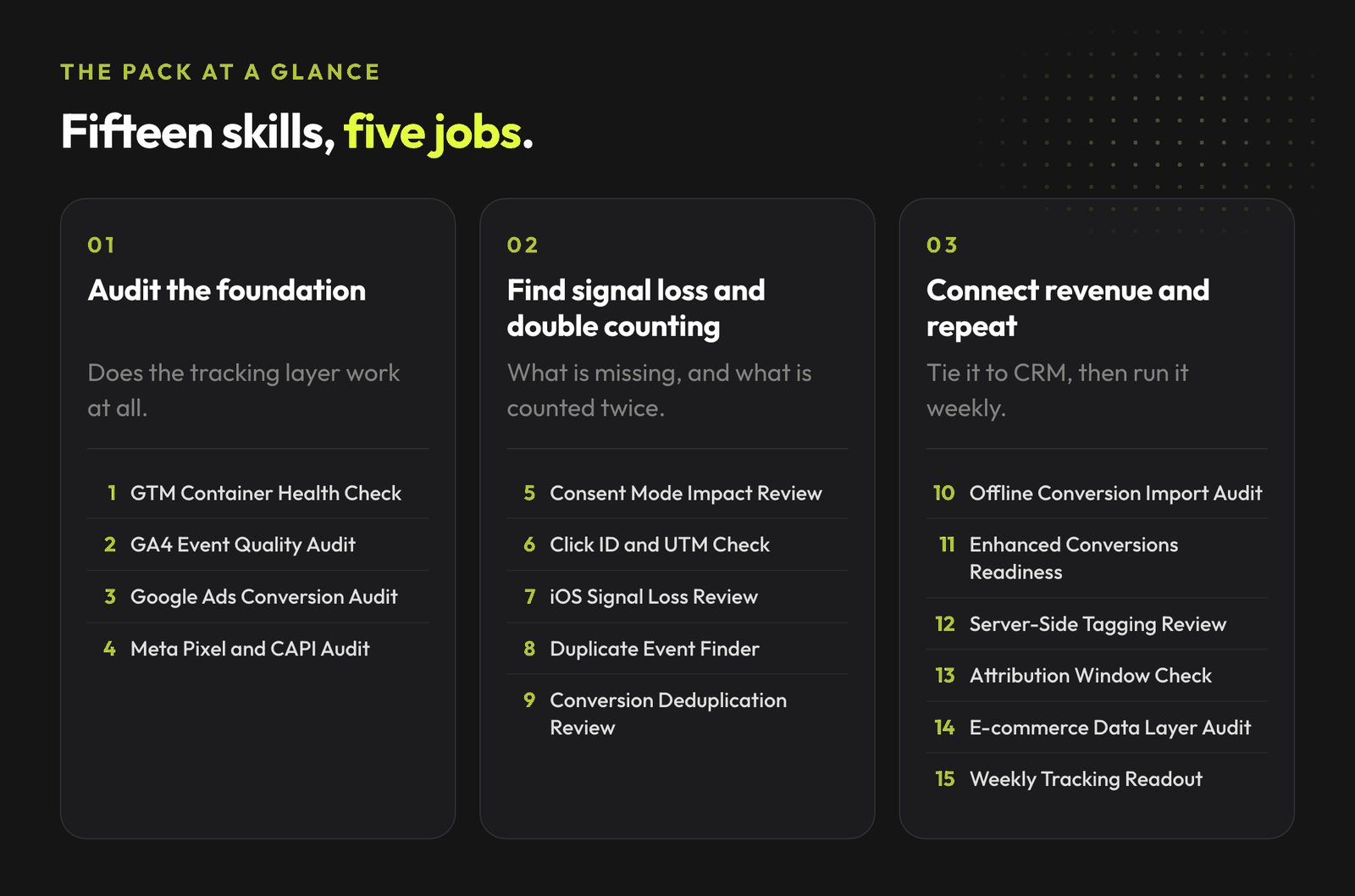
The 15 skills, grouped by job

Fifteen tracking skills in three groups: auditing the foundation, finding signal loss and double counting, and connecting revenue data.

1. Audit the account foundation

  • GTM Container Health Check: reviews container structure, naming, versions and obvious errors.
  • GA4 Event Quality Audit: checks event naming, parameters, key events and reporting logic.
  • Google Ads Conversion Tracking Audit: verifies conversion actions, values, attribution and primary or secondary setup.
  • Meta Pixel + CAPI Signal Quality Audit: reviews Pixel, Conversions API, event quality scores and deduplication.

2. Find signal loss

  • Consent Mode Impact Review: evaluates consent setup and estimates signal loss impact.
  • Click ID and UTM Sanitization Check: checks gclid, fbclid and UTM handling across pages and redirects.
  • iOS / Privacy Signal Loss Review: diagnoses the impact of privacy changes on signal quality.

3. Catch double counting

  • Duplicate Event Finder: finds events counted twice or fired from multiple sources.
  • Conversion Deduplication Review: verifies deduplication logic for Google Ads and Meta.

4. Connect CRM and revenue data

  • Offline Conversion Import Audit: reviews CRM offline import setup and match quality.
  • Enhanced Conversions Readiness Check: checks if Enhanced Conversions for Web or Leads are set up correctly.

5. Build the operating rhythm

  • Server-Side Tagging Feasibility Review: evaluates whether sGTM is worth it and what needs to move first.
  • Attribution Window Sanity Check: checks if attribution settings match your sales cycle and reporting needs.
  • E-commerce Data Layer Audit: reviews purchase, item and checkout data layer quality.
  • Weekly Tracking Signal Readout: produces a weekly tracking summary with confidence score and next actions.

What data should you bring?

Start with the data you actually have. Screenshots are fine for a first pass, but exports give the highest-confidence output.

  • GTM container export or container screenshot
  • GA4 event or key event reports
  • Google Ads conversion action settings
  • Meta Events Manager diagnostics
  • Meta Conversions API payloads or logs
  • Consent mode reports
  • CRM offline conversion import logs
  • E-commerce data layer samples
  • UTM and click ID test results

If the data is missing, the skill should say so. That is the point. Tracking work gets risky when AI sounds confident while the signal is dirty.

Run this before touching budget

Before you change a tag

If the account looks wrong, do not start with optimization. Start with the signal path: event, source, deduplication, consent and reporting confidence.

  • Find duplicate conversion claims
  • Catch missing click IDs and UTM breaks
  • Separate evidence from guesses

Open the tracking audit skills ->

Useful when ROAS looks good but the numbers do not feel real.

Free bundle

Claude Code Skills Bundle for Marketing

The full library of AdLume skills: paid ads, landing pages, B2B leads, GTM tracking, e-commerce.

The bundle goes straight to your inbox, then one email a week. Unsubscribe in one click. We never share your address.

Example: duplicate events

Use this when Meta, Google Ads, GA4 or your CRM disagree on what happened.

The Duplicate Event Finder looks at:

  • where the event fires
  • how many times it fires per user action
  • whether it fires from Pixel, CAPI, GTM or directly on the page
  • whether deduplication is configured

The output is not a vibe check. It should return a structured view:

Event

Source

Fires

Deduplicated?

Risk

Fix

Confidence

That turns “something is wrong with tracking” into a specific fix.

Use this after a cookie banner update, CMP migration or unexplained conversion drop.

The Consent Mode Impact Review estimates:

  • what percentage of users fall into each consent state
  • which events are affected
  • how modeled conversions fill the gap
  • whether the current setup matches your reporting needs

It does not recommend ignoring consent. It helps you understand what the signal loss means for your decisions.

What this repo does not do

The skills do not.

  • edit GTM containers
  • publish tags
  • change conversion actions
  • modify consent settings
  • change data layer code
  • claim performance impact without evidence

They are built for diagnosis and approval-ready recommendations.

Turn this into a weekly tracking check

Weekly operating rhythm

The goal is not a one-off audit. The goal is a repeatable signal quality habit before scaling spend or trusting platform recommendations.

  • Monday signal readout
  • Consent and privacy impact check
  • One approval-ready fix list

Build the weekly workflow ->

Run it read-only first. Anything that changes tracking still needs approval.

How to install

Claude Code

Clone the repo.

bash
git clone https://github.com/mardab96/gtm-tracking-claude-skills.git

Copy the skill folders into your user-level skills directory:

bash
cp -r gtm-tracking-claude-skills/* ~/.claude/skills/

Start a new Claude Code session. The skills activate automatically when their description matches what you are asking for.

Other Claude environments

Each skill is plain Markdown with YAML frontmatter. Paste the relevant SKILL.md file into context when you want to use it.

How to use the pack

Three practical starting points:

  1. Clone it and install the skills locally.
  2. Pick one platform and run one skill on it.
  3. Edit the required inputs and guardrails to match your process.

If you also run broader paid ads, you may want the companion packs:

The broader shift is simple: tracking is becoming a set of repeatable AI-assisted diagnostics.

The teams that win will keep the messy human parts visible: business context, signal quality, tradeoffs, approvals and the reason behind each change.

If your ROAS, CPA or conversion volume looks suspicious, start with the signal. Bad tracking makes every other optimization look smarter than it is.

  • Run one skill on the messiest part of your setup.
  • Name the missing evidence before changing tags or budgets.
  • Turn the fix into a repeatable weekly check.

Clean the signal before you scale spend

Free, open source, ready to adapt

Bad tracking makes every optimization look smarter than it is. Start with one messy part of the setup and turn the fix into a repeatable check.

  • Use the pack as-is
  • Fork the skills for your own process
  • Keep human approval on anything that writes to ad platforms or GTM

Download the GTM tracking skills ->

No form. No gate. Just the repo.

Sources

Done for you

Rather have it run for you?

AdLume watches your ad accounts and brings the next fix to your team's tools.

One email, on the day access opens. Nothing else, and you can leave the list with one click.

GTM tracking audit FAQ

Do these Claude Skills need write access to GTM?

No. The pack is diagnostic-first: the skills do not edit GTM containers, publish tags, change conversion actions, modify consent settings or touch data layer code. They produce diagnosis and approval-ready recommendations.

What data do I need to run a tracking audit skill?

Start with what you have: a GTM container export or screenshots, GA4 event or key event reports, and Google Ads conversion action settings. Screenshots are fine for a first pass; exports give the highest-fidelity read. If data is missing, the skill says so instead of guessing.

How do I install the skills in Claude Code?

Clone the GitHub repo, copy the skill folders into your user-level skills directory (~/.claude/skills/), and start a new Claude Code session. The skills activate automatically when their description matches what you ask for.

Is the skill pack free?

Yes. It is free and open source, with no form and no gate. Use one skill, adapt the required-data lists to your stack, or fork the whole pack.

Keep reading