
A free pack of 101 Google Ads prompts, grouped by the decision you are about to make rather than by campaign type.
This free Google Ads prompt pack gives you 101 ready-to-use prompts for campaign planning, keyword research, search terms, ad copy, Performance Max, budget checks, landing pages, conversion tracking and reporting.
It is built for business owners and marketers who need clearer Google Ads decisions without starting every AI conversation from a blank screen. Use the examples below to see how the pack works, then download the full PDF to get all 101 prompts.
All 101 prompts in one PDF: search terms, wasted spend, Performance Max, audits, tracking and reporting.
The PDF goes straight to your inbox. Unsubscribe in one click. We never share your address.
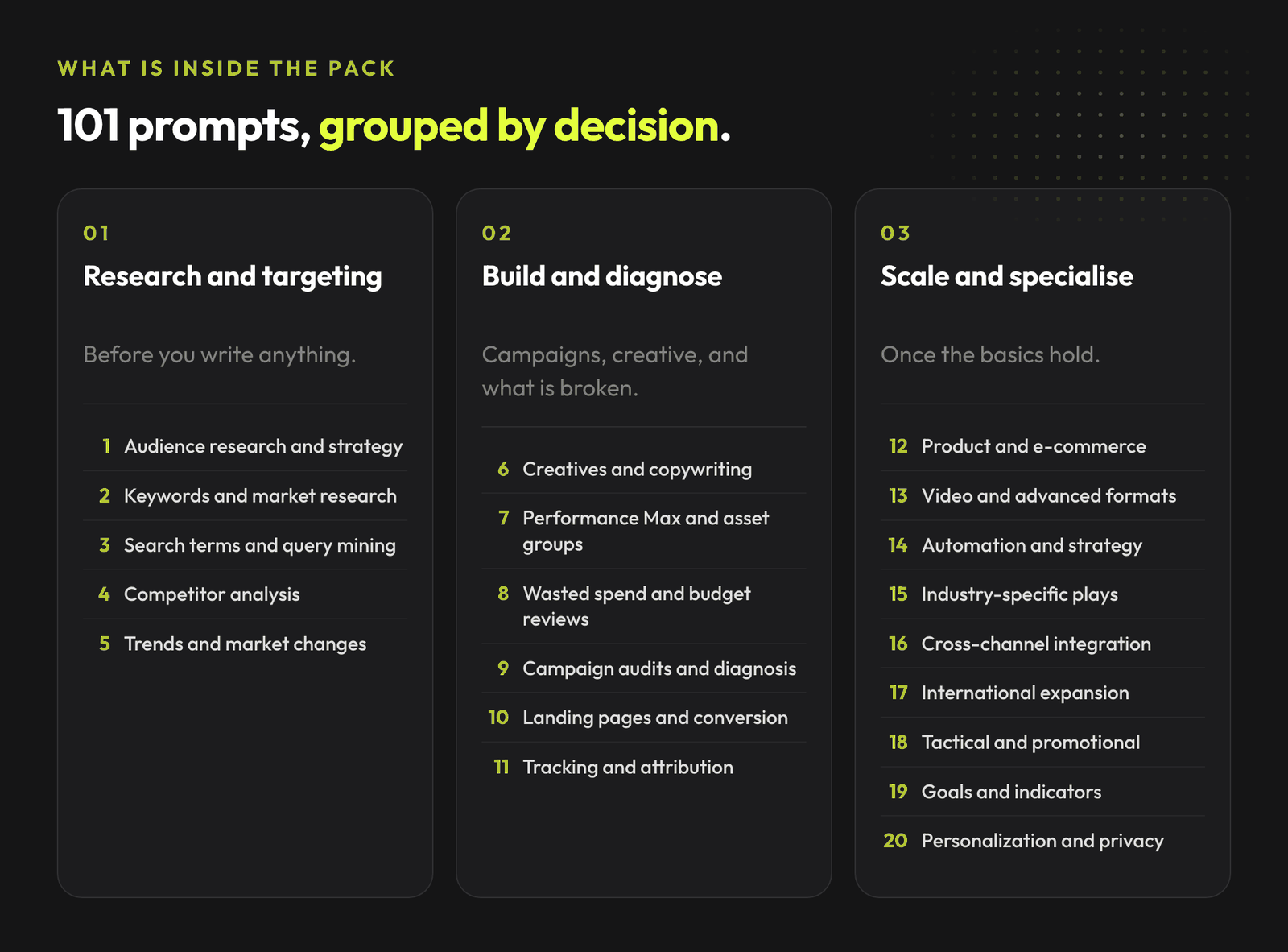
The full PDF is organized into 21 practical Google Ads prompt categories. Each category focuses on a different part of campaign strategy and account diagnosis, so you can ask for a specific decision instead of a vague answer like what should I do with my ads?
If you only use a few prompts from the pack, start with the ones closest to money: search terms, wasted spend, Performance Max and account audits.
Use these when you need to turn raw search query data into decisions: irrelevant queries, new keyword ideas, negative keyword candidates and mismatches between intent and landing pages.
Use these when spend is moving but the account story is unclear. They help you check budget waste across campaigns, keywords, placements, devices, locations and audiences.
Use these when Performance Max feels like a black box. They help you review asset groups, feed quality, audience signals, search themes, landing pages and reporting gaps.
Use these before a bigger account review, client call or internal decision. They structure what is working, what is risky, what needs more data and what should change first.
Here are a few examples from the pack. The full version includes 101 prompts with placeholders you can adapt to your own business, offer, budget and account data.
Act as a Google Ads target audience specialist. Create a detailed profile for my ideal
customer [PASTE YOUR TARGET AUDIENCE DATA] interested in [PRODUCT/SERVICE], including
demographic and psychographic data, problems, search behavior and online interests.
Focus on what motivates them to seek a solution like mine and what objections may block
conversion.
You are an experienced Google Ads specialist. For my company offering [SPECIFIC
SERVICE/PRODUCT], identify the 7 most important problems experienced by my ideal
customers [PASTE PERSONA]. For each pain point, suggest specific wording I can use in an
ad to address the issue and present my solution.
You are an expert on search intent in Google Ads. For my company offering
[PRODUCT/SERVICE], identify and classify the 10 main types of search intent of my
potential customers. For each intent, suggest relevant keywords, ad copy and landing
pages that best answer that intent.
The full library of AdLume skills: paid ads, landing pages, B2B leads, GTM tracking, e-commerce.
The bundle goes straight to your inbox, then one email a week. Unsubscribe in one click. We never share your address.
Act as an experienced Google Ads strategist. Help me design the optimal campaign
structure for [PRODUCT/SERVICE]. Based on these keywords [LIST OF MAIN KEYWORDS],
suggest a logical division into campaigns and ad groups that improves Quality Score and
reduces wasted CPC.
Act as a Google Ads search terms analyst. Review this search terms export [PASTE SEARCH
TERMS DATA]. Group queries into useful themes, wasted spend, negative keyword
candidates, new exact match ideas and landing page mismatch risks. Explain which changes
I should make first and why.
You are auditing wasted spend in a Google Ads account. Use this campaign data [PASTE
CAMPAIGN DATA] and find the campaigns, ad groups, keywords, locations, devices or
audiences that may be spending without enough qualified conversions. Separate hard
evidence from items that need more data.
Act as a Performance Max strategist. Review this PMax campaign data [PASTE DATA],
including asset groups, product feed, audience signals, search themes, conversion goals
and landing pages. Find the 5 highest-priority checks I should run before increasing
budget.
Act as a senior Google Ads auditor. Review this account summary [PASTE ACCOUNT SUMMARY]
and create a 10-point audit covering tracking, campaign structure, budget allocation,
search terms, landing pages, creative, bid strategy and conversion quality. Mark each
item as fix now, monitor or ignore.
Become an expert in improving return on ad spend in Google Ads. For my e-commerce
business selling [PRODUCT CATEGORY] with a target ROAS of [ROAS TARGET], create a plan
to improve return on ad spend. Include campaign analysis, budget reallocation, bid
checks and seasonal adjustments.
As a Google Ads cost-per-acquisition specialist, analyze my campaign for
[PRODUCT/SERVICE] with a current CPA of [CURRENT CPA] and propose a plan to reduce it
without losing conversion volume. Include funnel analysis, Quality Score improvements,
targeting changes and landing page checks.
Take on the role of an advanced conversion tracking expert in Google Ads. For my
business [BUSINESS TYPE] with a multi-stage conversion process, create a plan for
tracking and improving the conversion path using Google Tag Manager, micro and macro
conversions, attribution and offline conversion data.
The quality of the answer depends on the quality of the context you give to the model. Before using a prompt, collect the key facts about your business, offer, audience, budget, campaign structure, current results and constraints.
Use specific numbers and examples instead of broad labels. For example, e-commerce store selling premium dog food with a 150 PLN average order value and 15,000 PLN monthly ad budget will produce a better answer than online shop.
If you do not know what information to put into a placeholder, use reverse prompting: paste the prompt into your AI tool and ask what data it needs from you to produce a useful answer. Then fill in the missing context and run the prompt again.
If you want to go deeper after downloading the PDF, these guides connect the prompt pack to a broader Google Ads workflow:
Prompts are useful, but they are still manual work. You need to collect the data, paste it into the model, verify the answer, decide what matters and turn it into action.
That is why the bigger operating model matters. If you want to understand how AI fits into Google Ads strategy, Smart Bidding, Performance Max, conversion tracking and account diagnosis, read the AI in Google Ads agency playbook.
AdLume is being built around the same idea: fewer noisy account checks, clearer diagnosis and better next actions for advertising accounts.
AdLume watches your ad accounts and brings the next fix to your team's tools.
One email, on the day access opens. Nothing else, and you can leave the list with one click.
Yes. You can download the full PDF for free using the form on this page.
You can use the prompts with any strong LLM. For current market data, competitor research or recent Google Ads changes, use a model with web access or provide the relevant data yourself.
Yes. The pack includes prompts for search term analysis, negative keywords, intent grouping and query-to-landing-page checks.
Yes. Use them with campaign, keyword, placement, device, location and conversion data. They can help you find where to investigate first.
Yes. The pack includes prompts for Performance Max, e-commerce campaigns, product feeds, budget checks, creative assets and campaign diagnosis.
Both. Beginners can use them to get structure and avoid a blank screen. Advanced users can use them as diagnostic checklists and briefing templates for deeper account analysis.
No. Prompts can speed up thinking and surface ideas, but campaign decisions still need business context, data quality checks and human judgment. Treat AI output as a starting point, not a final answer.
Join the waitlist and get notified when the new AdLume is ready. It catches wasted ad spend automatically and optimises campaigns around the clock.
One email, on the day access opens. Nothing else, and you can leave the list with one click.