Key takeaways
- Run one workflow at a time with real inputs (exports, screenshots, CRM notes) instead of asking Fable to audit the whole account in one vague pass.
- The 10 workflows split into four jobs: audit before touching budget, diagnose the actual bottleneck, decide if the account can scale, and run a weekly rhythm.
- Every workflow keeps approval human: budget, tracking, campaign status, customer data and public creative never change silently.
- If you already have live data access, connect Fable through MCP instead of pasting exports manually.
Fable 5 stays open till July 12.
I would use the remaining time on the messy parts of performance marketing: tracking, lead quality, creative fatigue, landing page leaks, account structure, scale decisions, and weekly reviews.
AdLume
New version of AdLume launching soon
Join the waitlist and get notified when the new AdLume is ready.
It catches wasted ad spend automatically and optimises campaigns around the clock.
One email, on the day access opens. Nothing else, and you can leave the
list with one click.
The hard part is working through partial truths.
- Google says one thing.
- Meta says another.
- GA4 says something weird.
- Sales says the leads are bad.
- The landing page quietly breaks the promise from the ad.
The team still has to answer one question: what should we do next?
If you already have live data access, connect Fable through MCP instead of pasting exports manually. We wrote the setup guide here: Connect Claude Code to Google Ads and Meta Ads with MCP.
How to use this list
- Run one workflow at a time: do not ask Fable to audit the whole account in one vague pass.
- Bring real inputs: exports, screenshots, URLs, CRM notes, funnel data, sales notes, change history, and business constraints.
- Keep approval human: budget, tracking, campaign status, customer data, and public creative should not change silently.
The workflows
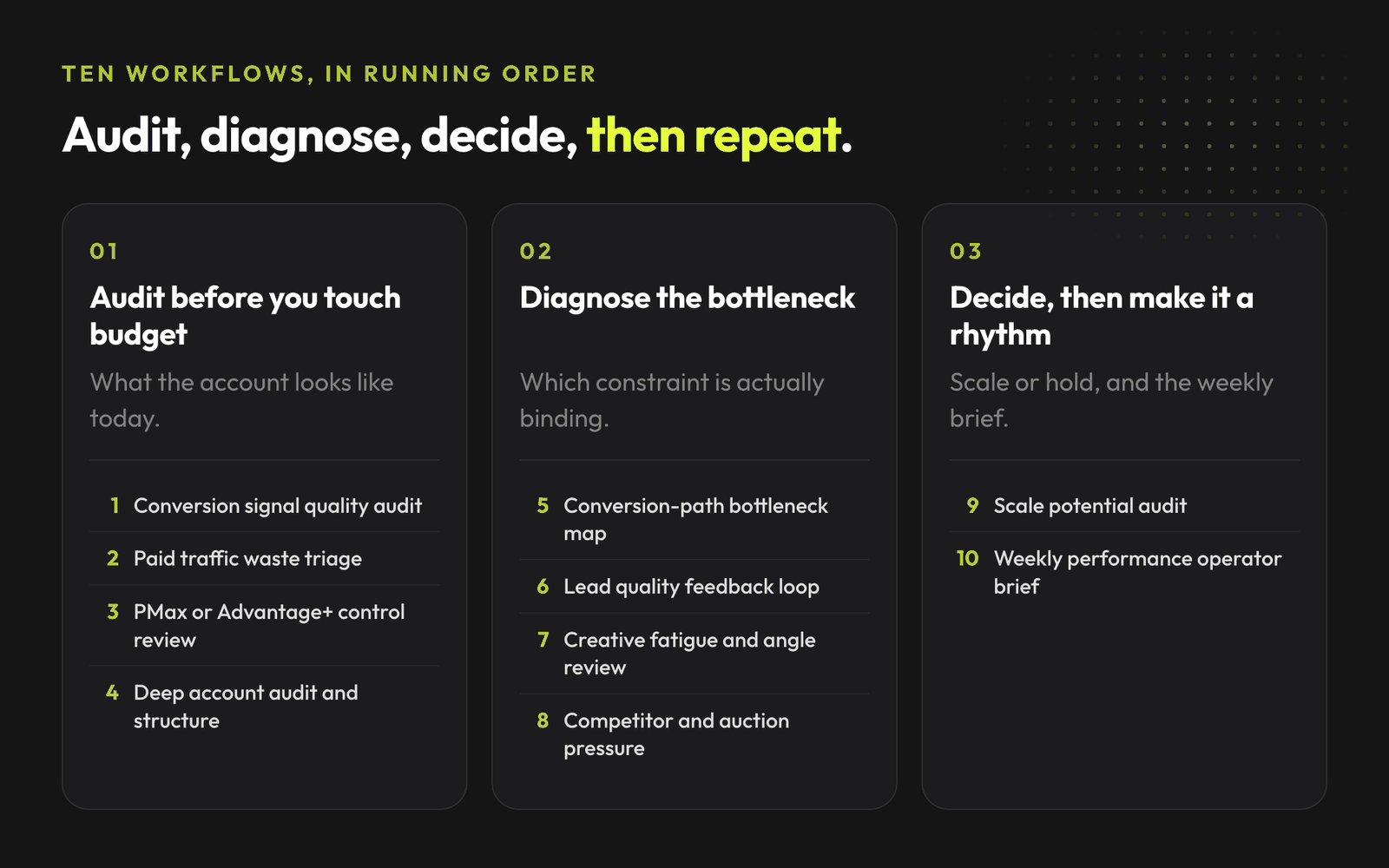
- Audit: signal quality, waste, automation control, account structure.
- Diagnose: conversion path, lead quality, creative fatigue, auction pressure.
- Scale: scale potential audit.
- Operate: weekly performance brief.
1 · Audit before you touch budget
01 · Conversion signal quality audit
Use when platform performance looks good, but business results do not match.
- Input: Google Ads conversions, Meta Pixel/CAPI, GA4 key events, CRM stages, offline imports, enhanced conversions, recent tracking changes.
- Prompt: Review this conversion setup and find the highest-risk signal issues. Separate confirmed issues, likely issues, missing data, and fixes that need human approval.
- Output: Signal risk score, weak conversion actions, missing offline feedback, duplicate or inflated events, repair queue.
- Approval: No tracking changes, offline imports, or primary goal changes without human review.
02 · Paid traffic waste triage
Use when spend is moving, but the account is not producing enough useful demand.
- Input: Campaign report, search terms, placements, audiences, cost, clicks, conversions, CPA, ROAS, last 7 vs 30 days.
- Prompt: Find where paid traffic is leaking budget. Split waste into intent, audience fit, placement quality, tracking noise, landing mismatch, and normal testing cost.
- Output: Waste pockets ranked by confidence, likely cause, recommended action, what to monitor after the change.
- Approval: Negatives, exclusions, pauses, and budget moves need review.
06 · PMax or Advantage+ control review
Use when automation is spending money, but the team does not understand what drives results.
- Input: PMax asset groups or Advantage+ report, goals, audience signals, categories, search insights, placements, feed diagnostics, recent changes.
- Prompt: Review the automated campaign for control risk. Explain what the system is likely optimizing toward and what guardrail to add.
- Output: Automation risk map, what to trust, what to inspect, guardrails, changes that are too risky right now.
- Approval: Human approval before goals, budgets, exclusions, feeds, or structure changes.
07 · Deep account audit and structure refresh
Use when the account has been patched for months and nobody trusts the structure anymore.
- Input: Account export, campaign names and objectives, budgets, bid strategies, goals, search terms, audiences, placements, assets, feeds, 30/60/90 day performance, change history.
- Prompt: Run a deep account audit. Find structural debt, unclear goals, campaign overlap, weak naming, budget fragmentation, and places where the account is hard to manage.
- Output: Account health summary, structure debt map, wasted complexity, overlap, goal risks, refresh plan, what not to touch.
- Approval: Human approval before structure, goals, budgets, bidding, feeds, or reporting-name changes.
Free bundle
Claude Code Skills Bundle for Marketing
The full library of AdLume skills: paid ads, landing pages, B2B leads,
GTM tracking, e-commerce.
The bundle goes straight to your inbox, then one email a week.
Unsubscribe in one click. We never share your address.
2 · Diagnose the actual bottleneck
04 · Conversion-path bottleneck map
Use when the team has competing theories about where performance is breaking.
- Input: Channel summary, top ads, landing page screenshots, form or checkout flow, funnel conversion rates, CRM notes, recent changes.
- Prompt: Map the path from ad click to sale, lead, booking, or checkout. Find the biggest bottleneck and the next diagnostic check.
- Output: Path map, suspected bottleneck, evidence for and against it, missing data, first fix to test.
- Approval: Review before changing campaigns, landing pages, forms, checkout, tracking, or follow-up.
05 · Lead quality feedback loop
Use when platforms report leads, but sales says the leads are weak.
- Input: Lead volume, CPL, form fields, CRM stages, disqualification reasons, sales notes, call outcomes, follow-up speed, source mapping.
- Prompt: Find why paid leads are not turning into qualified opportunities. Separate traffic, offer, form, follow-up, CRM mapping, and sales process issues.
- Output: Lead quality diagnosis, qualification repair plan, feedback loop for future campaigns.
- Approval: No form, CRM, or lead-routing changes without owner approval.
03 · Creative fatigue and angle review
Use when CPA rises, CTR drops, frequency climbs, or a winning creative stops winning.
- Input: Ad-level performance, creative names, screenshots, spend, CTR, CPM, CPC, CPA, ROAS, frequency, comments, landing page.
- Prompt: Review these ads for fatigue and angle decay. Explain what kind of creative should be tested next, based on the evidence.
- Output: Fatigue diagnosis, surviving signal, angle refresh direction, 5 creative briefs.
- Approval: Human review before publishing creative.
09 · Competitor and auction pressure review
Use when costs rise and the account team starts guessing.
- Input: Auction insights, CPM/CPC trends, impression share, lost share by rank and budget, competitor ads, landing pages, offer changes, seasonality.
- Prompt: Find whether performance got worse because of auction pressure, weak execution, or market changes.
- Output: Cause map, evidence for and against it, response plan, next-week watchlist.
- Approval: Human review before bid, budget, or offer changes.
3 · Decide if the account can scale
08 · Scale potential audit
Use before deciding whether the account is ready for more spend.
- Input: 30/60/90 day performance, current budget, target CPA/ROAS, impression share, creative coverage, landing conversion, CRM/revenue feedback, demand, capacity, margin.
- Prompt: Audit the account for scale potential. Decide whether the next growth constraint is budget, bidding, creative, landing page, tracking, demand, economics, or structure.
- Output: Scale / hold / fix-first verdict, biggest constraint, budget ceiling hypothesis, safest next scale test.
- Approval: Human approval before budget increases, bid strategy changes, landing changes, or major creative production.
4 · Turn it into a weekly operating rhythm
Use every week, even when nothing is on fire.
- Input: Last 7 vs previous 7 days, last 30 days, spend, CPA, ROAS, revenue, leads, campaign changes, tracking notes, creative notes, CRM or sales notes, open decisions.
- Prompt: Create a weekly performance operator brief for a founder, CMO, or performance owner. Separate what changed, why it matters, noise, action, approval, and what to watch.
- Output: One-page brief, facts vs hypotheses, decisions, approvals, next-week watchlist.
- Approval: The brief can recommend. A human decides.
New version of AdLume launching soon
You can use Fable to test these workflows now.
A new version of AdLume is launching soon for teams that want this kind of account review running in the background.
Join the waitlist.
Done for you
Rather have it run for you?
AdLume watches your ad accounts and brings the next fix to your team's tools.
One email, on the day access opens. Nothing else, and you can leave the
list with one click.
FAQ
Do I need MCP or API access to use these workflows?
No. Each workflow runs on real inputs you already have: exports, screenshots, URLs, CRM notes, funnel data and change history. If you have live data access, connecting Fable through MCP just saves the manual pasting.
Can Fable change my campaigns directly?
No. Every workflow keeps approval human: budget, tracking, campaign status, customer data and public creative should not change silently. Fable prepares the diagnosis and recommendation, a human decides.
Which workflow should I run first?
Start with the audits before touching budget: the conversion signal quality audit when platform results do not match business results, or paid traffic waste triage when spend moves without producing useful demand.
How often should I run the weekly performance operator brief?
Every week, even when nothing is on fire. It separates what changed, why it matters, noise, action, approvals and the next-week watchlist for a founder, CMO or performance owner.
